Code Generation AI: How It Works and Where Teams Use It
Code Generation AI explained: models, use cases, measured results, security controls and a practical adoption roadmap for engineering teams.
October 26, 2026
The most popular advice on code generation AI is to give every developer a seat, accept more completions, and watch output rise. That's the wrong scoreboard. Code that appears in seconds can still cost you hours in review, testing, debugging, and rework, and a team that only counts lines or pull requests won't see where the time went.
Judge these tools by net engineering effort, the total work left after someone checks, runs, fixes, and maintains what the model wrote. When checking is fast and reliable, generation saves real time. When checking is slow or uncertain, you've moved work from the author to reviewers, testers, and whoever handles the next incident.
Table of Contents
- What Code Generation AI Is and Where It Fits
- How the Models Behind Code Generation Differ
- Prompts That Hold Up and Where Agents Fail
- Deployment Patterns and What Teams Measure
- Metrics That Separate Real Output From Fast Typing
- Security, Licensing and Governance Controls to Set Up
- Start a Scoped 90-Day Pilot Before Scaling
What Code Generation AI Is and Where It Fits
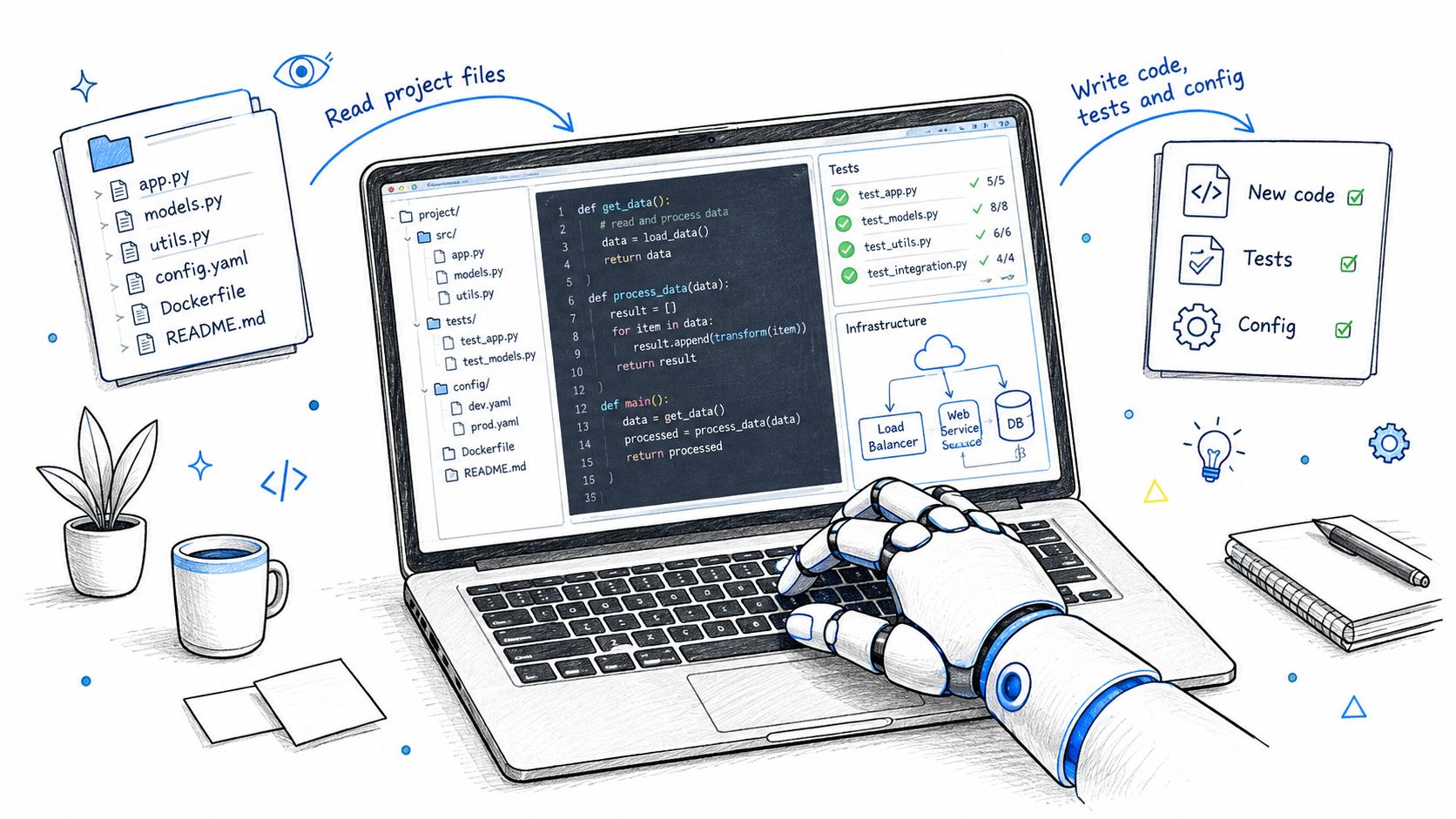
Code generation AI means models that read a prompt, the surrounding code, and project context, then write or change source code, tests, and infrastructure definitions. Think of a fast, well-read typist rather than an engineer who owns the outcome. The model has seen many patterns, but it doesn't know your system, your customers, or your last outage unless you show it.
Say you open a billing service and type a comment asking for a function that retries a failed payment. An assistant inside your editor, such as GitHub Copilot, Cursor, or JetBrains AI Assistant, drafts the loop, picks a backoff pattern, and fills in the logging calls. You still decide whether retrying is safe, whether the payment could be charged twice, and whether the error types match your provider.
That gap between drafting and deciding is where these tools fit. Readers comparing definitions and tool categories may find value in exploring code generation with RapidNative, especially where it separates simple generation from broader development workflows.
Six Jobs, Six Different Risks
Early tools mostly completed a single line. Current tools do more, but each job fails in a different place, so you shouldn't govern them as one feature.
| Use case | What it produces | Where it breaks |
|---|---|---|
| Autocomplete | Next lines or tokens inside the open file | Repeats outdated patterns and invents API names |
| Synthesis | New function, class or module from a comment or spec | Misses edge cases and project conventions |
| Refactor | Rewritten code meant to keep behaviour unchanged | Silent behaviour changes where tests are thin |
| Tests | Unit and regression tests for existing code | Tests that assert the current bug as correct |
| Infrastructure as code | Terraform, Kubernetes and CI/CD configuration | Over-permissive IAM roles and unpinned versions |
| Agents | Multi-file patches, test runs and pull requests | Long tasks stall or drift and need human review |
Autocomplete and small synthesis jobs need the least setup because a developer sees the result immediately. Agents need the most controls because they can change several files, run commands, and open a pull request before anyone has inspected the reasoning.
An early timing result helps explain the enthusiasm, and its limits. In a randomized controlled experiment conducted in spring 2022 with 95 professional programmers implementing an HTTP server in JavaScript, the group with GitHub Copilot completed the programming task 55.8% faster than the control group, according to the randomized controlled experiment report.
Practical rule: adopt a use case where its output can be checked quickly, because checking, not typing, sets the real cost.
That trial tested one bounded task. It didn't prove that every ticket, legacy change, or incident fix gets faster by the same amount.
How the Models Behind Code Generation Differ
A large language model predicts the next token, much as a phone keyboard predicts the next word. A token might be a word fragment, a symbol, or part of a variable name. After training on millions of lines of code, the model learns which sequences commonly follow others, including brackets, imports, common algorithms, and typical naming patterns.
That mechanism explains both the fluency and the mistakes. The model is selecting plausible next pieces, not compiling a mental model of your running system. If a library method looks likely from its training patterns, it may produce that method even when your installed version doesn't have it.
Training Shapes Behaviour
A general decoder model learns from web text plus public code. It's usually good at explaining an error or turning plain language into a first draft, but it's more likely to invent APIs and miss private conventions.
A code-specialised model trains mostly on source repositories across many languages. It tends to handle syntax, idioms, and repetitive implementation patterns well. Its weakness can appear when a task needs broader reasoning about requirements, architecture, or ambiguous business rules.
Fill-in-the-middle models learn a different trick. They see code before and after a missing section and predict what belongs between them. That's why inline completion can insert a loop inside an existing function instead of only continuing from the cursor at the end of a file.
An instruction-tuned assistant adds prompt and response training, often with human feedback on which answers people preferred. It follows requests like write tests for this function or explain this stack trace. It can still sound confident while being wrong, so you need execution and tests, not tone, as evidence.
| Model family | How it is trained | Strongest at | Typical limit |
|---|---|---|---|
| General decoder LLM | Next-token prediction on web text and public code | Explaining code and drafting from plain language | Invented APIs and weak fit to private codebases |
| Code-specialised LLM | Next-token prediction on large source corpora across many languages | Syntax-heavy completion and idiomatic patterns | Narrower reasoning outside code |
| Fill-in-the-middle model | Trained on prefix, suffix and a missing middle section | Inserting code between existing lines | Accuracy depends on surrounding context |
| Instruction-tuned assistant | Prompt-response training plus human feedback | Chat-style synthesis, refactors and test drafts | Confident wrong answers unless tests are run |
| Agentic system | LLM in a loop with file, shell and test tools | Multi-file changes and environment setup | Errors compound over long tasks; cost rises per run |
Context and the Agent Loop
The context window is the model's desk size. It limits how much code, documentation, error output, and conversation the model can consider at once. A bigger desk helps, but dumping a whole repository onto it doesn't guarantee the model will pick the right files or notice the one rule that matters.
An agentic system wraps the model in a loop of plan, act, and observe. It searches files, edits code, runs a shell command or test suite, reads the result, and tries again. Tool access makes it more capable than chat alone, and also gives errors more places to compound.
Teams comparing several models inside one workspace may want to review how providers package model choice and controls, including client AI services from Veevoo. Compare the same model in the workflow you'll run in day to day, because an IDE completion, a chat answer, and an agent run are three different products in practice.
Prompts That Hold Up and Where Agents Fail
Long repository work is where confident demos meet hard limits. On SWE-Bench Pro, which evaluates issues requiring multi-file patches and work spanning hours or days, widely used models achieved less than 45% Pass@1, meaning the first proposed patch solved the task, with the best reported results reaching 43.6% under a unified evaluation scaffold described in the SWE-Bench Pro evaluation. The same evaluation reports more than 70% on SWE-Bench Verified, a different benchmark in the same family. Which benchmark a vendor quotes changes how capable its model appears, and a high score on curated tasks doesn't settle whether an agent can maintain your repository.
There's also a familiarity problem. The same source found models could identify buggy file paths from issue descriptions with up to 76% accuracy on SWE-Bench-related tasks, while performance fell by as much as 47 percentage points on external repositories. A model that looks strong on public issues it may have absorbed during training can behave like a different tool entirely on your private codebase.
Write Prompts With a Check Built In
A weak prompt names a goal and hopes. A stronger prompt names boundaries, examples, and the verification step. Teams building that discipline can apply the methods in this guide to prompt engineering best practices to coding requests, then adapt the wording to their repositories and test tools.
- Tests: Write pytest unit tests for parse_invoice() covering empty input, negative totals, and currency rounding, don't modify the function, and assert the documented error types.
- Refactor: Migrate this module from callbacks to async/await, keep public signatures unchanged, run existing tests after each file, and list every behaviour change.
- Infrastructure: Write Terraform for a private S3 bucket with KMS encryption and versioning, no public ACL, variables for region and tags, and a list of every assumption.
Notice what each prompt forbids. The test prompt protects the function from silent changes, so the reviewer checks assertions instead of hunting for hidden edits. The refactor prompt protects callers and forces repeated test runs after every file. The infrastructure prompt blocks a common exposure and makes hidden assumptions visible before anyone applies the plan. Each forbidden move is one less thing a human has to catch in review.
Don't ask only for code. Ask for the evidence that the code does what you requested.
Asking for proof costs one extra line in the prompt. It saves a round of debugging later.
Where Agents Drift
An agent can find the likely files and still fix the wrong cause. It may edit a symptom, update a snapshot to match broken output, add a dependency you don't allow, or keep iterating after tests reveal it misunderstood the ticket. Long tasks give each small wrong choice more code to build on.
The true cost of a drifted run never shows up in the demo. It shows up as the senior engineer spending an afternoon auditing an unfamiliar diff to learn why it fails. Judge agents by the engineering hours left after review, testing, and debugging, not by how quickly a patch appears on screen.
Evaluate models on fresh, organization-specific issues they haven't had a chance to memorize. Before merging an agent change, require test execution, diff review, dependency checks, and human approval, because each control protects a different result: test runs defend correctness, diff review keeps the scope honest, dependency checks keep unapproved packages out, and approval leaves a named owner on the change.
Deployment Patterns and What Teams Measure
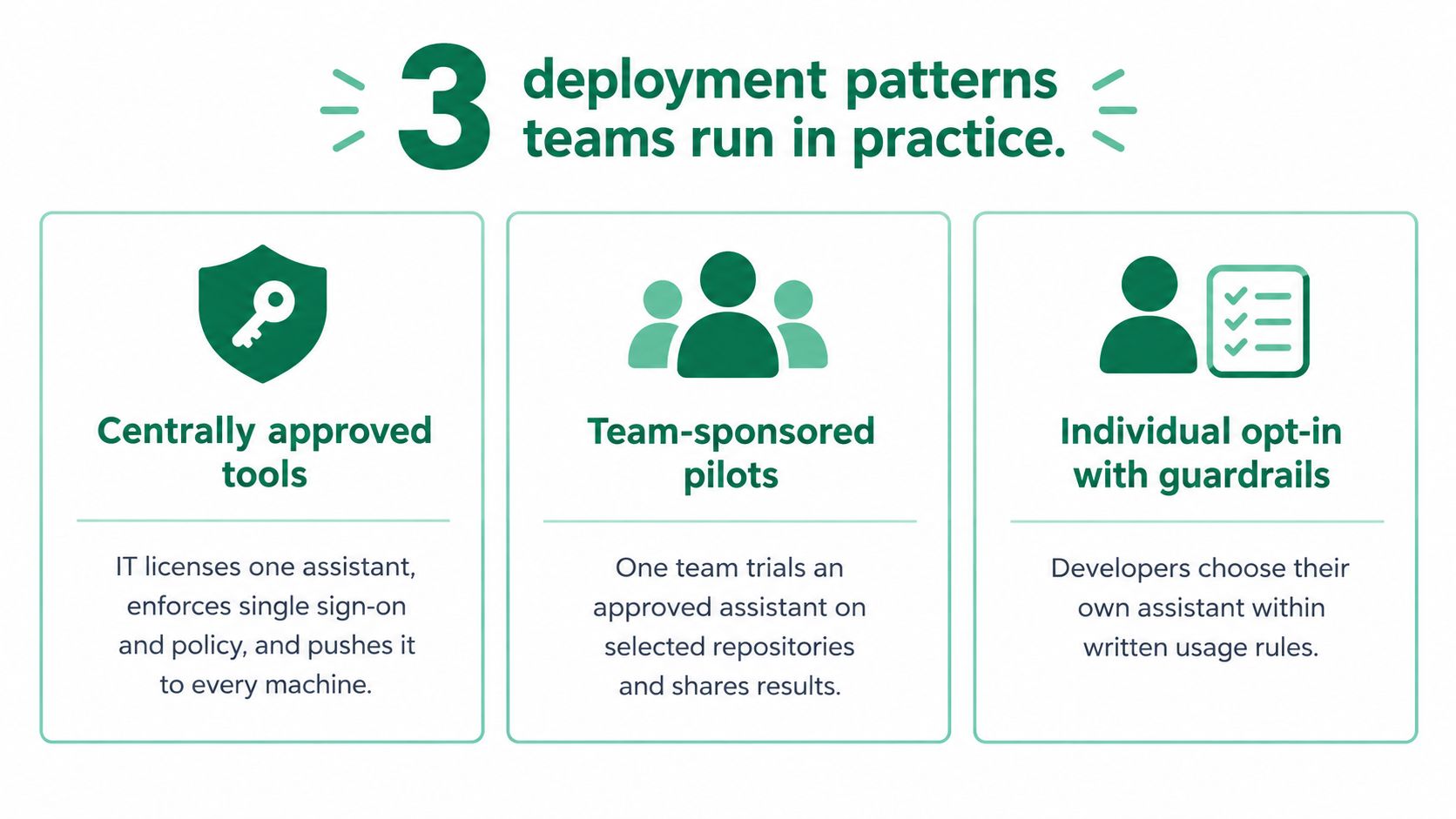
Teams deploy code generation AI in three ways, and each pattern trades speed of adoption against visibility. None is automatically right. The question is whether you can see what is being used, limit what it can touch, and measure what changed, because the pattern you pick decides which measurements are even possible.
Centrally approved tools give IT and security one licensed assistant, single sign-on, policy settings, and a managed rollout to every machine. Teams may wait for approval before they can start, so adoption runs slower, but leaders know which tool processed code and which settings applied. Uniform configuration also makes comparison cleaner, since every developer works under the same data and retention rules.
Developer-selected IDE assistants spread quickly because each developer installs what fits a preferred editor. The cost is weak visibility. You may not know which tools touched sensitive repositories, which data settings were active, or why results differ between teams. Measurement then starts with an inventory rather than a dashboard, because you cannot attribute a change in output to a tool you have not catalogued.
Agentic workflows give an agent a scoped repository, a sandbox, and a branch. The agent opens pull requests for human review instead of writing directly to a protected branch. This pattern handles larger tasks than autocomplete, and the pull request is where the cost lands: reviewers absorb the effort the agent saved the author. It needs tight limits on credentials, commands, files, and run time, and each limit exists to keep the review step from becoming the bottleneck that erases the gain.
The visual below summarizes the three common patterns teams run in practice.
What Adoption Looks Like in Practice
Acceptance does not mean every suggestion was good, but it shows whether developers keep generated code in their work. In an enterprise randomized trial involving GitHub Copilot, developers accepted approximately 30% of the assistant's suggestions, according to the GitHub and Accenture enterprise study.
That same study reported that 90% of developers committed AI-suggested code and 91% said their teams had merged pull requests containing such code, while 70% experienced less mental effort on repetitive work and 54% spent less time searching for information or examples.
Those figures describe uptake and perceived relief, not proof that delivery improved end to end. Controlled trials inside large engineering organizations have also measured gains in development speed after accounting for other predictors, so the effect is not only self-reported. The question for your rollout is narrower: after review, correction, and testing, did the task take less total engineering effort than before?
Deploy first where tasks are bounded and repeatable. A test-writing rollout or a single narrow refactor pattern gives you a clean comparison, because the inputs and the definition of done stay fixed while you change only what writes the first draft. A promise to transform all engineering at once gives you no such control.
Metrics That Separate Real Output From Fast Typing
Benchmarks are useful, but they're not delivery metrics. HumanEval, introduced in July 2021, contains 164 manually written Python programming problems with function signatures, docstrings, candidate implementations, and unit tests, according to the HumanEval benchmark comparison.
Its contribution was important because a model had to produce code that passes tests, not merely code that looks plausible. Pass@1 measures the probability that a single generated solution is correct. That tells you about first-attempt correctness on small tasks, not whether a feature reached production safely.
Measure the Whole Path to Production
| Metric | What it tells you | Reference point |
|---|---|---|
| Pass@1 | Chance a single generated solution is correct on the first try | Compare models on the same HumanEval-style task set |
| Cycle time | Elapsed time from ticket start to production | Set from pre-rollout baseline |
| Pull-request throughput | Merged pull requests per developer per week | Baseline from the weeks before rollout |
| Rework rate | Share of AI-authored lines rewritten within a release cycle | Track from the first release cycle |
| Defect escape rate | Bugs reported after release per change | Compare AI-assisted and human-written changes |
| Review latency | Hours a pull request waits for first review | Set from pre-rollout baseline |
| Review effort per change | Reviewer minutes on AI-assisted versus human-written code | 38% of developers said AI code took more review effort |
Start with cycle time because it captures waiting, review, testing, and release, not only authoring. If pull requests rise while cycle time stays flat, the bottleneck may have moved to reviewers or CI rather than disappeared.
Rework rate catches code that passed an initial look but didn't survive contact with the codebase. Track the share of AI-authored lines rewritten within a release cycle, and inspect whether the rewrite came from changed requirements, defects, readability, or architecture mismatch.
Defect escape rate asks what reached users or later environments. Split it by code origin where you can tag AI-assisted changes reliably, and pair it with rollback frequency. For teams strengthening the test side of that measurement, this overview of automated test engineering helps connect test coverage to release evidence rather than treating test count as quality.
Review latency and review effort per change expose the verification bottleneck. A flood of large pull requests can make authors look faster while senior reviewers absorb unpaid extra work. Log reviewer minutes, comment rounds, and requested changes per pull request.
The Verification Gap
Survey evidence shows why those review measures matter. In survey evidence summarized in an enterprise verification study, 96% of developers did not fully trust AI-generated code to be functionally correct, only 48% said they always checked AI-assisted code before committing, and 38% said reviewing AI-generated code required more effort than reviewing human-written code.
Generation speed is an input. Net productivity is what's left after review, testing, debugging, and maintenance.
Report every metric by task type, including greenfield code, legacy modification, tests, refactoring, and incident fixes. A gain on a bounded exercise doesn't automatically transfer to a legacy service with thin tests. Set baselines before rollout, or you'll end up arguing from memory after seats are already bought.
Security, Licensing and Governance Controls to Set Up
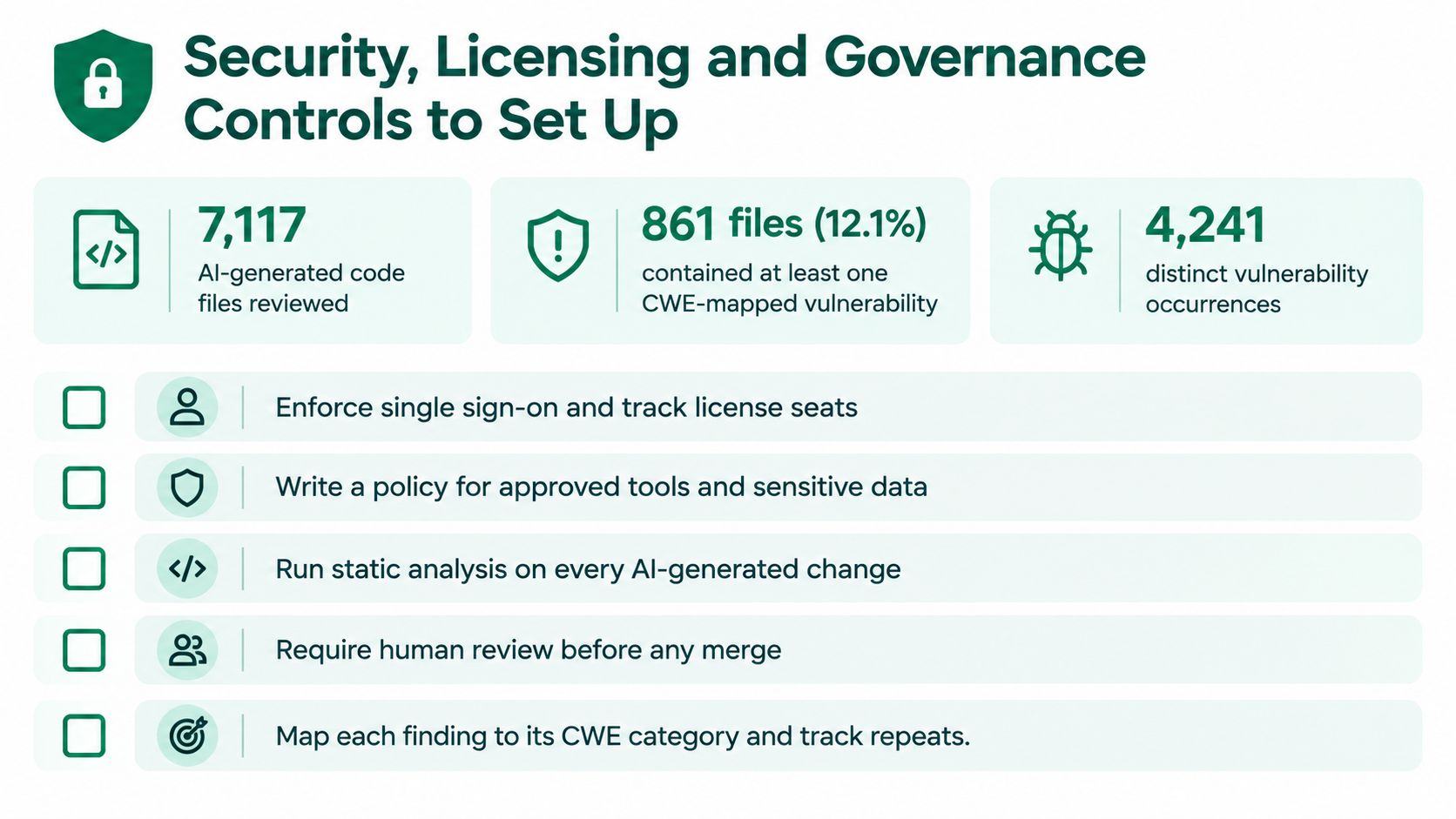
Generated code can compile, pass a happy-path test, and still carry a known weakness. In a large-scale analysis of 7,117 AI-generated code files, 861 files, or 12.1%, contained at least one Common Weakness Enumeration (CWE)-mapped vulnerability, according to the large-scale AI-generated code analysis. Researchers recorded 4,241 distinct vulnerability occurrences across those files.
That last figure matters because one file can contain several weaknesses. A clean-looking percentage can hide repeated input validation, authentication, or configuration problems in the same artifact.
The security summary below places those file counts beside the controls teams should assign.
Risk also changes with language and task design. One study of 1,689 generated programs found vulnerabilities in approximately 40% overall, including about 50% of C programs and 39% of Python programs, according to the generated program security study.
Controls Mapped to the Metric They Protect
- Secret scanning: run it at pre-commit and again in CI to protect against leaked credentials and tokens.
- Static analysis and dependency checks: run them on every generated change to protect defect escape rate and vulnerability count.
- License scanning: flag copied snippets under restrictive licences and keep a provenance record for each flagged match.
- Sandboxed execution: give agents least-privilege credentials and no production access to limit blast radius.
- Provenance logs: tag AI-assisted commits so defects, rework, and incidents can be split by code origin.
- Human approval: require it on protected branches, especially for infrastructure, authentication, and data access changes.
- Adversarial testing: schedule red-team exercises for agent workflows, prompts, and tool permissions.
- Post-release monitoring: track incidents by code origin so repeat generated weaknesses become visible.
For a tool-specific view of agent permissions and repository safeguards, this discussion of Claude Code security is useful context when you're setting sandbox and approval rules. Deloitte reports AI-generated code was the top concern among surveyed security and IT leaders, in its Deloitte generative AI risk analysis.
The video below walks through related security risks in AI-assisted coding and where teams place checks.
Assign one named owner to each control. Ownership protects delivery speed because developers know who can resolve a blocked scan, approve an exception, or update a rule that's producing noise.
Start a Scoped 90-Day Pilot Before Scaling
A pilot should answer a narrow question for each task type. Does this tool reduce net effort after review, testing, and debugging, without weakening quality gates? If you can't answer that, you don't have a rollout case yet.
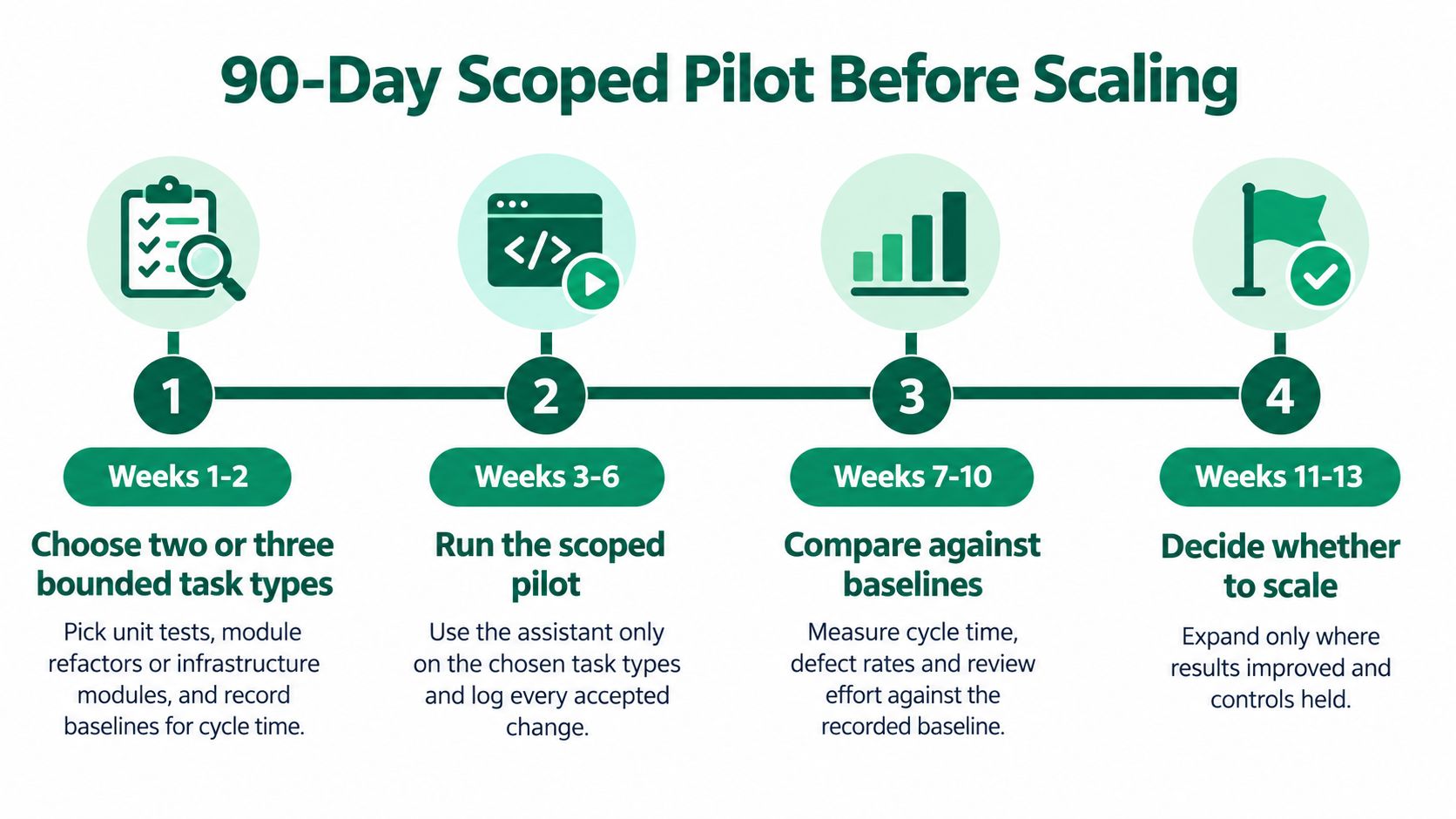
The roadmap below shows the four phases in sequence.
Four Phases in 90 Days
- Weeks 1 to 2, choose and baseline: pick two or three bounded task types, such as unit tests, module refactors, or infrastructure modules, then record cycle time, pull-request throughput, rework, and review latency.
- Weeks 3 to 6, run the scoped pilot: use approved tools with scanning, provenance, sandboxing, and human approval active, and log reviewer minutes per change.
- Weeks 7 to 10, compare net effort: compare each task type against its baseline, including debugging and rework, rather than counting total output.
- Weeks 11 to 13, decide by task type: expand where net effort fell, narrow where only some repositories worked, and stop where verification consumed the gain.
If you're framing the pilot as an investment decision, this guide to building an AI proof of concept can help you define success criteria before vendors or internal enthusiasm set them for you. Write the stop rules down now. A pilot that can only succeed will produce a presentation, not evidence.
Pitfalls That Inflate the Result
- Counting lines or completions: these measure production, not accepted, durable value.
- Weak test coverage: don't let agents refactor critical modules before tests can catch behaviour changes.
- Production credentials: never give an agent broader access than the scoped task requires.
- Ignoring debugging time: log it separately from initial authoring time.
- Buying seats first: assign control owners before a company-wide purchase creates pressure to justify it.
- Scaling from averages: a gain in test writing doesn't prove a gain in incident fixes.
Debugging deserves its own line in the pilot log. In 2025, 45% of surveyed developers said debugging AI-generated code was time-consuming, according to Stack Overflow's 2025 Developer Survey.
Before choosing pilot tasks, create an account through Applied's AI use case and tool library to check how similar organizations scoped implementations by industry, business function, and outcome. Borrow their measurement logic where it fits, but keep your baselines from your own repositories.
Create an account with Applied to access its library of AI use cases and tools organized by industry, business function, and outcome, so you can compare code generation approaches against real implementation patterns before your pilot begins. Use those examples to choose bounded tasks, set credible baselines, and decide which controls and metrics your team will track from day one.