AI ROI Calculator: Inputs, Formulas, and Payback
Build an AI ROI calculator with cost, NPV, payback, and scenario ranges leaders can defend in 2026.
October 31, 2026
Most organizations now use AI somewhere, but far fewer can show it moving company earnings. In McKinsey's 2025 global survey, 88% of respondents said their organizations regularly use AI in at least one business function, yet only 39% reported any AI-related impact on enterprise-level EBIT. That's the gap a credible AI ROI calculator has to close. It shouldn't translate adoption, enthusiasm, or a tidy pilot into profit. It should show a project return, the slice of earnings that return can realistically move, and the evidence you'll collect after launch to replace the forecast.
Table of Contents
- Inputs and Formulas for an AI ROI Calculator
- How to Run the Calculator Step by Step
- Worked Numbers from Real Deployments
- Scenario Ranges That Survive Scale-Up
- Pitfalls and the Post-Launch Check
- Decide Go Redesign or Stop
Inputs and Formulas for an AI ROI Calculator
A useful AI ROI calculator produces two results: return for one named workflow and that return as a share of organizational earnings. The first helps a team decide whether the use case pays. The second keeps a local saving from being presented as a company-wide earnings result. Faster experimentation may support innovation, but it belongs on the profit line only when it changes revenue, cost, or margin.
The Copy Ready Sheet
| Line | What to enter | Formula or rule | Practical range |
|---|---|---|---|
| Implementation cost | Licenses, integration, data cleanup, security, change management | Sum of one-time cash outlays | Often larger than year-one seats |
| Annual operating cost | Inference or seats, monitoring, human review | Recurring cost that scales with volume | Rises as usage rises |
| Labor benefit | Hours returned times loaded wage times adoption | Do not book unsold capacity as cash | Local fully loaded wage |
| Avoided cost | Vendor, overtime, rework, or error spend that stops | Count only spend that is removed | Zero if the spend continues |
| Revenue uplift | Baseline revenue times uplift, signed by a named owner | Model separate bands, not one hope | Set use-case-specific scenarios |
| Time horizon | Years of cash flows | Match the path to satisfactory return | 3 to 5 years |
| Discount rate | Company hurdle or WACC | Discount each year's net cash flow | 8% to 12% if unset |
| Payback | Upfront cost and annual net benefit | Upfront divided by annual net benefit | Report the conservative case |
| NPV | Discounted benefits minus discounted costs | Sum of present values | Negative NPV stops the case |
| IRR | Rate that sets NPV to zero | Compare with the hurdle rate | Unstable if signs flip |
| Earnings share | Benefit versus organizational earnings | Stops a pilot looking like company ROI | Report the calculated share |
How Finance Will Challenge Each Line
Define costs in audit order. One-time cost includes licenses, integration, data cleanup, security review, and change management, not just the vendor quote. Annual run cost includes inference or seats, monitoring, and human review. It should rise with volume. A model that holds run cost flat while usage triples understates the cost of success. For older systems, legacy platform investment guidance for CTOs helps frame integration and remediation in the upfront bill.
Keep benefits separate. Labor benefit is hours returned times a fully loaded rate times actual adoption. Count it as cash only when managers remove overtime, avoid a hire, or redeploy people to work that was previously bought or left undone. Avoided cost is spend that stops, such as a vendor contract that is canceled. Revenue uplift needs a named owner in sales, product, or operations who can sign the estimate and explain its mechanism, such as conversion, retention, or throughput that was turning customers away. Without an owner, enter zero.
Practical rule: If a benefit can't name the budget line it changes, keep it in a capacity bucket and out of payback.
Use a three-to-five-year horizon rather than a pilot quarter: implementation costs arrive early, while benefits may lag workflow redesign. Annual net benefit equals adopted gross benefit minus run cost. Simple payback equals upfront cost divided by annual net benefit. NPV discounts each year's net cash flow at the company hurdle rate, or at 8% to 12% if finance has not set one, then sums the present values. IRR is the rate that sets NPV to zero. It can be compared with the hurdle rate, but becomes unreliable when cash flows change sign repeatedly.
Add unit economics, such as net benefit per transaction, ticket, or engineer-month. That view makes it easier to check whether a project-level forecast follows from the work being changed. For a broader view of how these measures connect to business outcomes, see Applied's analysis of AI business impact.
How to Run the Calculator Step by Step
Run the calculator on one workflow, not on a company-wide AI program. A program blends strong and weak use cases until no one can tell which one earns the money back. One workflow has a volume, an owner, and a baseline you can defend.
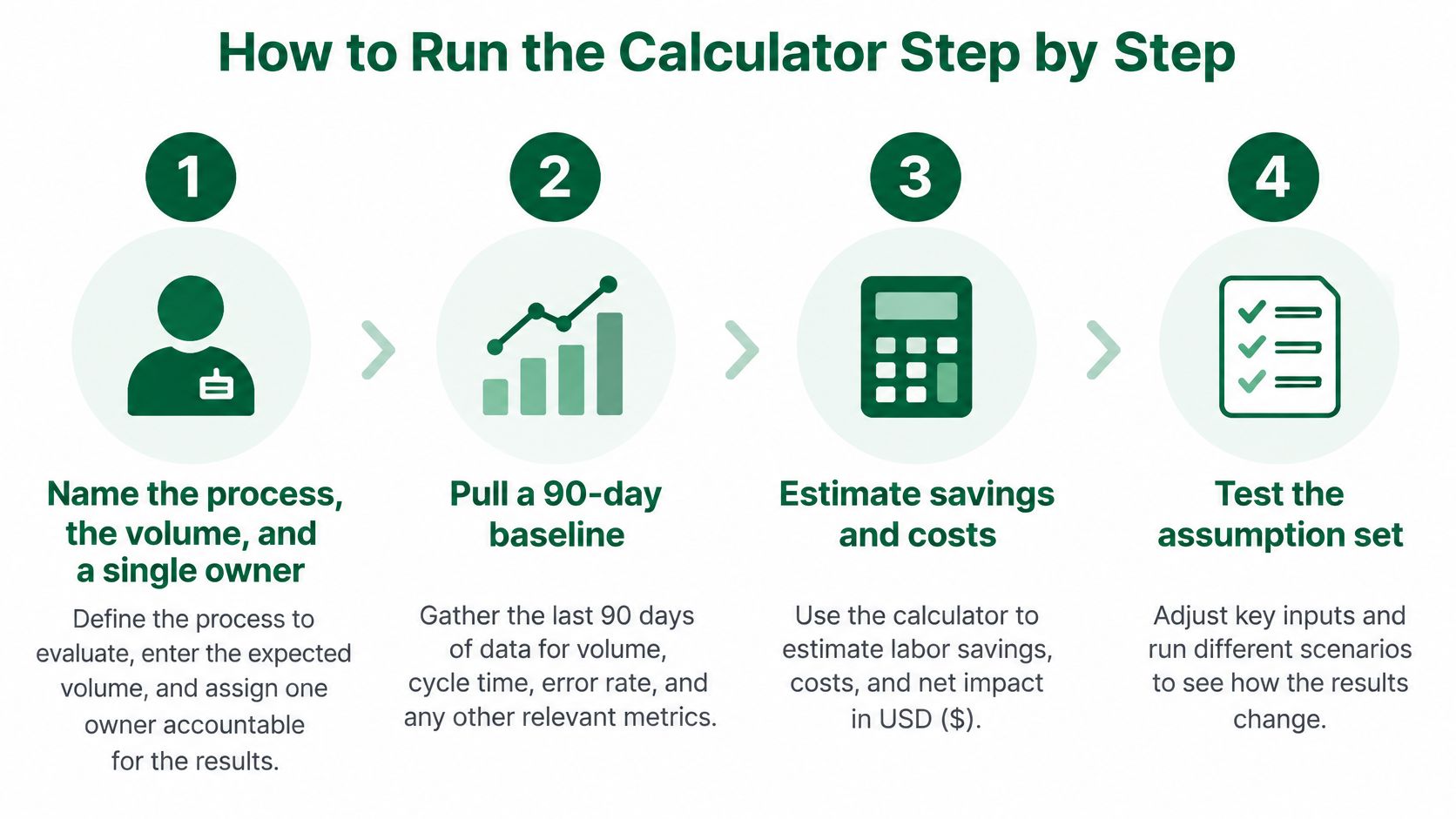
The visual below compresses the build into four moves, from naming the process to testing the assumptions.
The Eight Steps
- Name the process, volume, and owner: Pick one process, state monthly volume, and assign a single owner in operations or engineering who can change how the work is done.
- Pull a 90-day baseline: Record volume, cycle time, error rate, and fully loaded labor before any tool is turned on, because a baseline guessed after launch will always flatter the tool.
- List the costs pilots hide: Add data remediation, integration, security review, training, and supervision, then split one-time from annual costs.
- Estimate four benefit buckets only: Hours returned, spend avoided, revenue, and capacity that isn't yet cash. Don't add the last bucket into profit.
- Apply adoption and a quality haircut: Multiply gross benefit by an adoption rate below 100 percent, then subtract rework from false positives and the extra human review the system creates.
- Compute the decision numbers: Annual net benefit, simple payback, NPV at the finance hurdle, IRR, and net benefit per transaction or per engineer-month.
- Write the assumption beside each cell: Note the wage, the volume source, and who signed the revenue line, so a reviewer can challenge inputs instead of arguing about the total.
- Label the result Forecast: Keep that label until observed usage replaces the adoption guess with measured behavior.
Quality Inputs Belong on the Same Tab
Financial inputs alone will mislead you, because a system can look productive while generating errors that someone else pays to fix. The U.S. National Institute of Standards and Technology's AI Risk Management Framework guidance recommends measuring and documenting performance before and after deployment, including false-positive and false-negative rates, prediction latency, training time, and uncertainty. Put accuracy, latency, error rates, and review minutes in the same sheet as the dollars, and test under conditions similar to production rather than relying on a vendor demo with clean inputs.
Build it as one spreadsheet tab with columns for line item, owner, data source, low, expected, and high values, assumption note, and a status flag set to Forecast or Actual. Any team can rebuild that template in a spreadsheet tool in an afternoon. Each audience then reads its own row. Operations reads hours and cycle time. Engineering reads cost per task and review load. Executives read NPV and earnings share.
The walkthrough below shows the same discipline applied live, with assumptions exposed rather than buried in a total.
Worked Numbers from Real Deployments
Published results belong in the same calculator as your own costs, but they need careful classification. Hours saved are capacity, not cash, until managers redeploy that time or reduce overtime, staffing, or purchased services. The relevant question is how much of the use case's return can reach earnings.
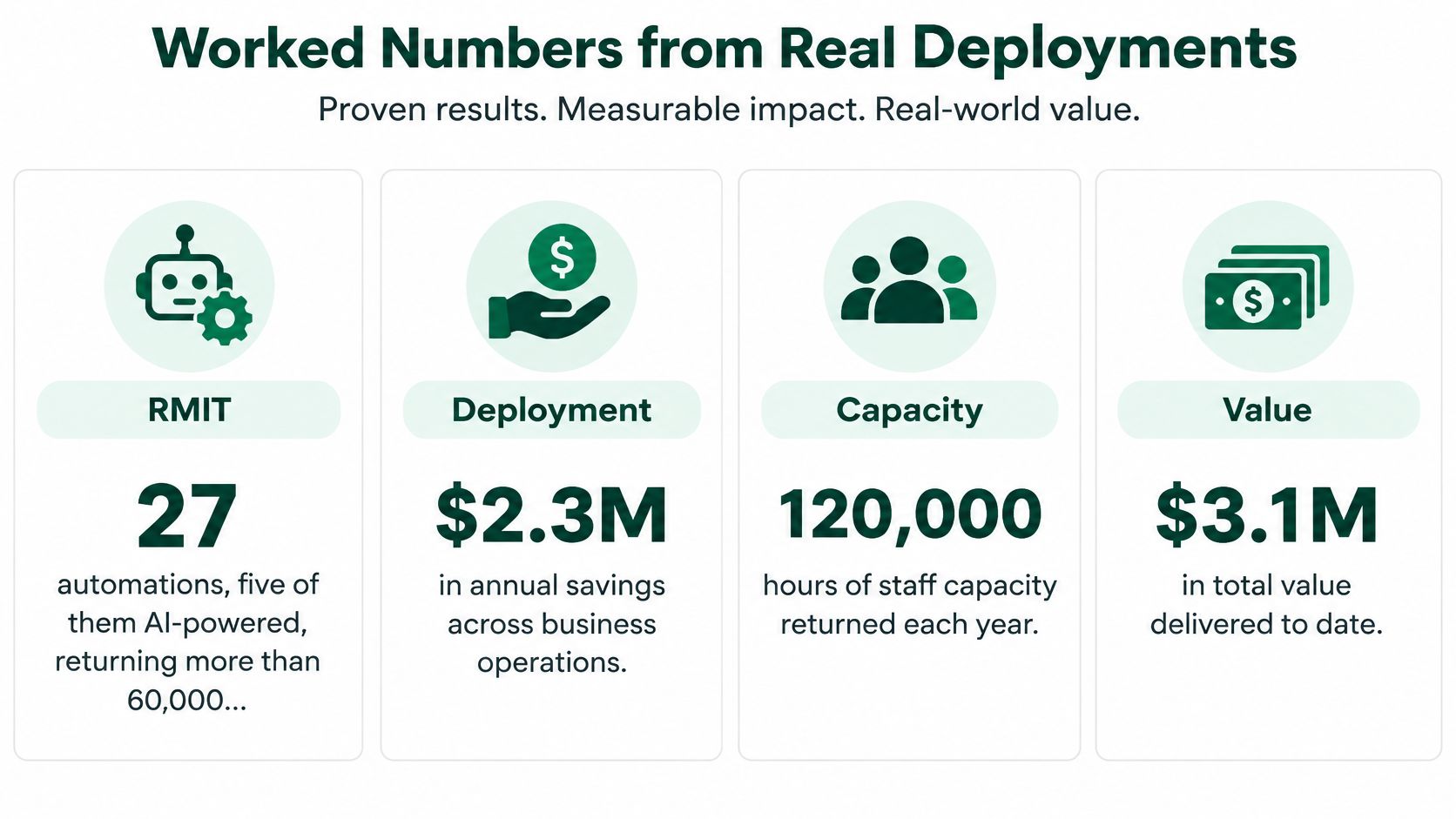
The dashboard compares four cases by result type and by the calculator row each can support.
Four Cases Through One Sheet
RMIT's automation work illustrates how to treat reported staff-hour savings: as capacity until a specific share is redeployed or converted into lower costs. At an illustrative $45 loaded hourly rate, 60,000 hours would represent $2.7 million in gross labor value, but that is not automatically a cash benefit. Spread over three years, the reported total averages about 20,000 hours a year.
Stripe's engineering example illustrates a different calculation: value a completed migration using the time saved and your own loaded engineer rate, then count only migrations that recur. A one-off migration is a one-off benefit, not an annual run rate. For the inference costs of engineering tools, Loupe's guide to LLM return on investment can help frame the model-usage cost line.
Luminate's data-delivery case is best treated as cycle-time capacity. It becomes revenue only when supported by a specific outcome, such as an SLA penalty avoided, reduced churn, or additional customers served by the same team. Hexaware's new-hire training case fits a time-to-productivity row: value the time before employees become client-ready, but do not count it as headcount reduction.
| Case | Reported result | Cash or capacity | Calculator row |
|---|---|---|---|
| RMIT automations | Staff-hour savings over three years | Capacity until hours are removed or redeployed | Labor benefit times redeployed share |
| Stripe engineering migration | Faster software migration | Capacity, repeated only for recurring migrations | Labor benefit per repeated migration |
| Luminate data delivery | Faster customer data delivery | Capacity unless SLA or churn data exists | Cycle-time value, revenue only if supported |
| Hexaware new hires | Faster time to client-ready status | Time-to-productivity | Capacity, no headcount cut |
| Revenue bands (McKinsey 2025) | 36% none, 39% at 1-5%, 12% at 6-10%, 7% above 10% | Cash only if an owner signs | Conservative, expected, and upside revenue lines |
Setting the Revenue Cell
Avoid a default uplift without an accountable owner. In McKinsey's 2025 workplace survey, 39% of respondents reported a 1-5% revenue increase from generative AI, 12% reported 6-10%, and 7% reported above 10%, while 36% reported no revenue change. Use these reported bands as scenarios, with no change as the conservative case. For a content workflow with named savings, Vizient's Writer deployment and reported 4x ROI on healthcare content offers a specific case to compare with a generic uplift assumption.
A worked payback keeps the cash logic visible. For example, $400,000 upfront divided by $300,000 annual net benefit gives 1.3 years simple payback. Count that result only if the cash benefit holds under the conservative case.
Scenario Ranges That Survive Scale-Up
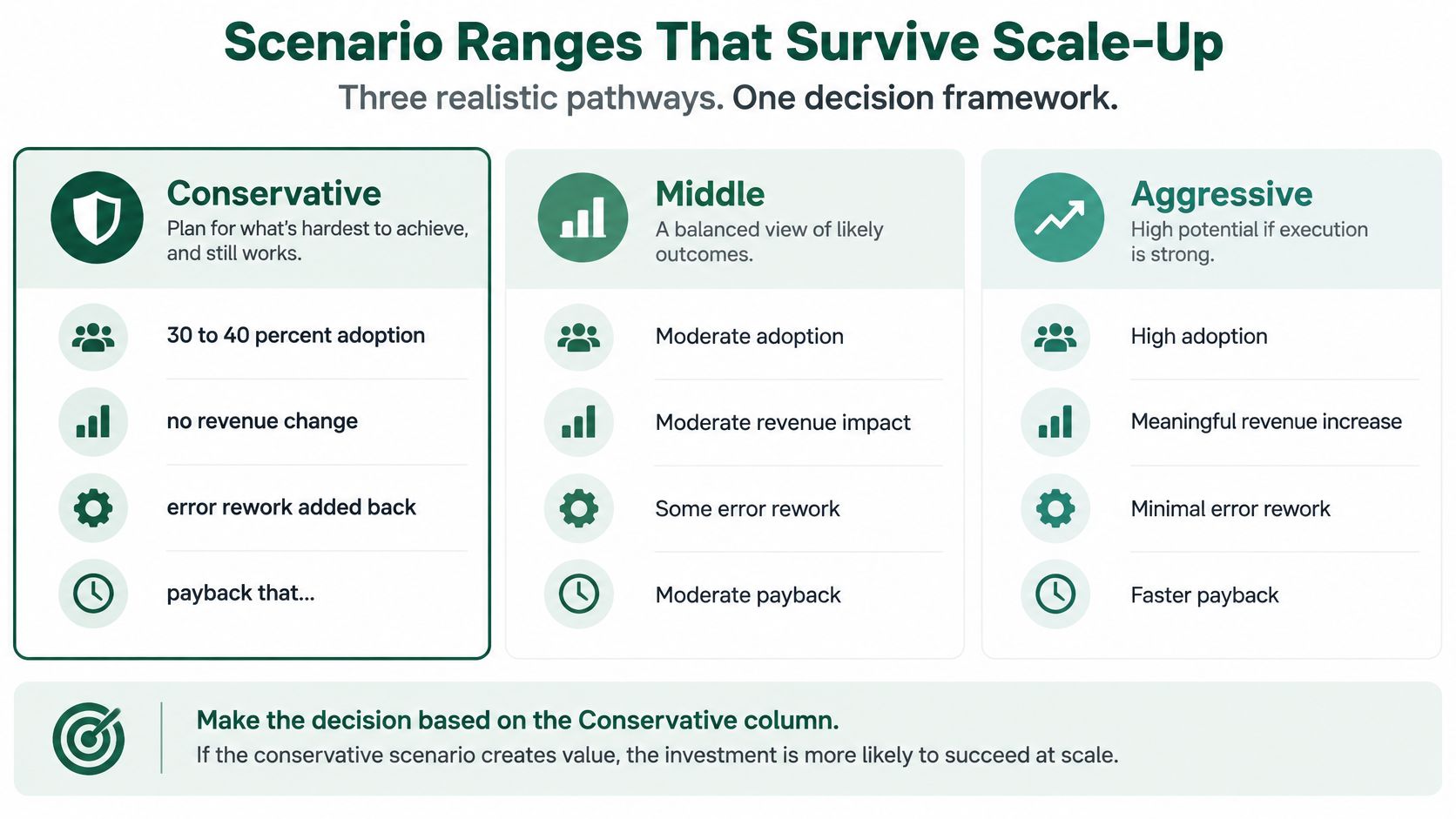
A forecast is only useful if its assumptions can be tested. Compare conservative, expected, and upside cases, then base the funding call on the conservative case.
| Scenario | Adoption | Revenue assumption | Payback stance | Scale test |
|---|---|---|---|---|
| Conservative | 30-40% adoption | No revenue change | May exceed 2-4 years | Fails if review time or errors erase the hours saved |
| Expected | Adoption observed in the pilot | 1-5% only with a named owner | Within a 2-4 year window | Requires production use and workflow redesign |
| Upside | High sustained usage | 6-10% or above 10% | Under 12 months is uncommon | Must hold after the pilot team leaves |
Why the Conservative Column Deserves the Decision
In Deloitte's 2025 research on AI investment returns, 84% of leaders investing in AI or generative AI said they were gaining ROI. That finding captures reported returns, not proof that a pilot will produce the same result across departments. Many generative-AI pilots struggle to sustain value at scale, so a pilot result should not be multiplied by headcount.
Use 30 to 40 percent adoption and no revenue change in the conservative case, and count error rework as a cost. The expected case uses adoption observed in the pilot, with a 1-5% revenue line only when a named owner signs off. The upside case can include 6-10% or above 10% revenue and high sustained usage, while subtracting the additional inference cost at higher volume. Treat that case as a ceiling, not the funding basis.
The Five Levers That Flip Payback
Calculate the break-even threshold for each lever. The thresholds show which operating conditions the business case depends on.
- Adoption rate: The point below which net benefit turns negative, indicating how much adoption the case requires.
- Error rate: The false-positive level at which rework consumes the hours saved.
- Inference cost per task: The maximum unit cost the return can absorb, especially as agentic workflows add model calls.
- Human review minutes: The review time per output that erases labor savings.
- Loaded wage: The local labor rate used to value hours saved.
Model pilot success, production deployment, user adoption, workflow integration, and sustained value as separate stages, then multiply their probabilities. A case that depends on every stage succeeding with near certainty is fragile. Include data remediation, integration, governance, security, monitoring, and change management in the relevant stage costs, not only in launch costs.
What must stay true: Adoption remains above break-even, review time does not consume the hours saved, and a process owner remains accountable after the pilot team moves on.
Wages and cloud prices change labor and run costs across markets, but the scenario structure remains useful: three cases, five break-even levers, and probabilities for each stage. The calculator should show which use case earns a return and how much of that return depends on earnings growth, then replace the forecast with post-launch measurement rather than treating a vendor-level ROI as the result.
Pitfalls and the Post-Launch Check
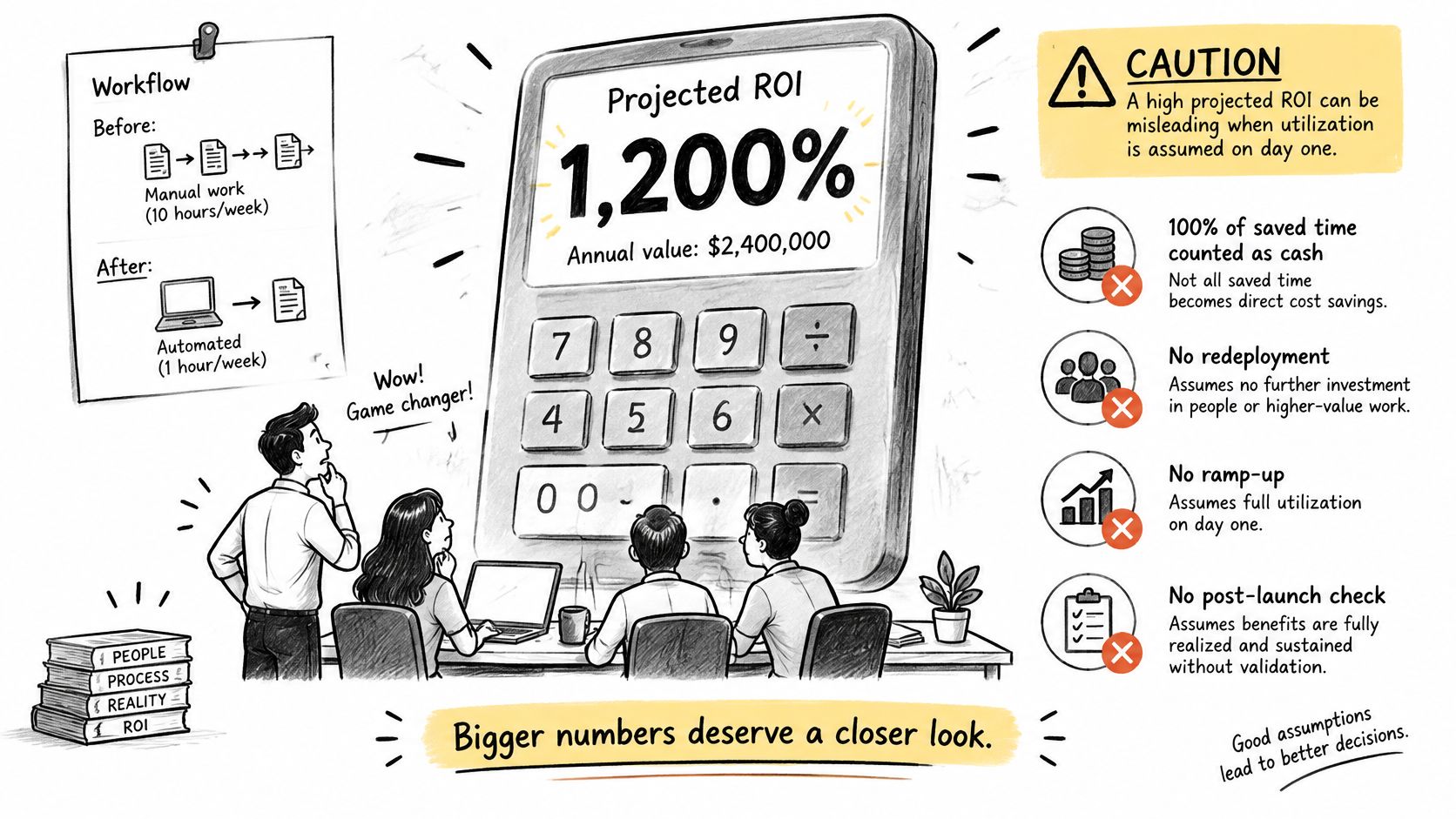
A very high projected ROI usually assumes full utilization from day one and leaves supervision out of the cost model. A forecast shows what could happen; only post-launch measurement shows what did.
The illustration below captures what happens when a team finds that the headline number relied on assumptions nobody recorded.
The Mistakes That Inflate the Forecast
- Booking all saved time as cash: Hours returned are capacity unless the team is redeployed, staffing is reduced, or overtime falls.
- Using a vendor accuracy number: Demo performance may not reflect production inputs, edge cases, or how employees phrase real requests.
- Ignoring false positives: Wrong outputs create rework and additional review, often by people whose time is costly.
- Using one KPI for every system: A copilot that drafts text and an agent that takes actions need different measures and measurement periods.
- Skipping the baseline: Without a before measurement or comparison group, seasonal changes and other causes can be credited to the tool.
- Copying the pilot everywhere: A first site with clean data and an engaged team may not represent the results at other sites.
- Treating workflow return as an EBIT impact: A team-level saving affects earnings only if it flows through allocation and changes a reported line.
Attach a Measurement Design to the Same Sheet
Pair the estimate with a measurement plan. In Deloitte's 2025 survey of 1,854 executives, satisfactory ROI for a typical AI use case usually takes two to four years, while 6% reported payback in under 12 months. Deloitte also found that fragmented systems make before-and-after measurement difficult. Name the system of record for each metric before launch. Data readiness and ownership are also among the AI implementation challenges that can complicate measurement.
Record baseline volume, cycle time, error rate, and cost before deployment. Set an adoption threshold below which the benefit remains zero, rather than crediting the system with full value at low usage. Schedule checks at 30, 90, and 180 days. At each checkpoint, replace the forecast with actual usage, review minutes, and error rates, then recalculate payback and NPV.
Track accuracy, latency, review time, and adoption alongside dollars; these measures help explain changes in the return. For a copilot, track acceptance rate and edit distance. For an agent, track task completion, escalation rate, and action errors.
At each checkpoint, the owner signs a validation checklist: baseline locked; adoption measured from system logs; review minutes timed; errors sampled; benefit classified as cash or capacity; forecast replaced with actuals. If two or more items remain unchecked at day 90, the ROI on the slide is still a hypothesis.
Decide Go Redesign or Stop
End the review with a decision rule, not a recap of formulas. Finance doesn't need another explanation of NPV. It needs to know what result triggers funding, what result triggers a redesign, and what result ends the conversation.
The Three Tests for Go
Approve the investment only if all three pass. First, conservative-case payback sits inside the agreed horizon, using low adoption, no unsigned revenue, and rework added back. Second, the earnings-share row stays believable next to company results, so no one is claiming a workflow tool will move enterprise profit by an implausible amount. Third, a named owner commits to replacing the forecast with actuals at 30, 90, and 180 days, with dates in a calendar and access to usage logs. If the third test fails, you're not funding a measured investment. You're funding a slide.
Redesign when the labor case works only at 100 percent adoption, when review time wipes out the hours saved, or when revenue has no owner. Those are fixable problems. Narrow the workflow to the highest volume, lowest error segment, add routing so simple cases skip review, or move the revenue claim into the capacity bucket and reprice the case on cost alone. Stop when NPV stays negative after hidden costs are included and the workflow can't be narrowed further. A smaller, honest stop now is cheaper than a scaled disappointment later.
What Each Person Brings to the Meeting
- Operations: Baseline hours, cycle time, and the name of the manager who'll redeploy or remove the capacity.
- Engineering: Cost per task at expected volume, latency under production-like load, and the review load the system creates.
- Executives: NPV, conservative payback, and the percent of earnings at stake, stated plainly enough that the board could repeat it.
For the next working session, create an account at Applied and use its library of AI use cases and tools, organized by industry, business function, and outcome, to replace guessed benefit rows with measured results from similar work. Applied is one source among your internal baselines and vendor references, and its value here is specificity, named deployments with quantified outcomes you can drop into low, expected, and high cells. Rerun the conservative and expected cases with those figures. Don't scale a pilot until the post-launch check is scheduled and the owner has agreed to publish actuals against the forecast, whatever they show.
Replace your guessed benefit rows with evidence before your next finance review. Applied gives you a library of AI use cases and tools organized by industry, business function, and outcome, so you can anchor adoption, savings, and payback assumptions in deployments that resemble yours. Create an account, pull the closest matching cases into your calculator, and walk into the meeting with a conservative case you can defend.