AI Computer Vision Explained: Use Cases, KPIs and Pilots
Learn how AI computer vision works, which techniques fit which industries, the KPIs that prove value, and how to run a pilot that survives production.
October 25, 2026
A vendor demo just ran cleanly in your conference room. The camera found every scratch, every missing label, every worker without a helmet. Now you're wondering what happens on Tuesday afternoon, on the night shift, when glare hits the lens and a new product variant comes down the line. That's the right question. AI computer vision is useful when it keeps making the right call under your site's conditions, not when it performs well on a curated test set.
Table of Contents
- What AI Computer Vision Is and the Core Tasks It Performs
- How Vision Models Learn and Which Architecture Fits
- Enterprise Use Cases by Industry and Their Outcomes
- Which KPIs Prove Computer Vision Creates Value
- Toolchain, Governance and ROI Model
- How to Run a Vision Pilot Step by Step
- Where Vision Projects Break and How to Fix Them
- Pick One Use Case and Set Its Baseline
What AI Computer Vision Is and the Core Tasks It Performs
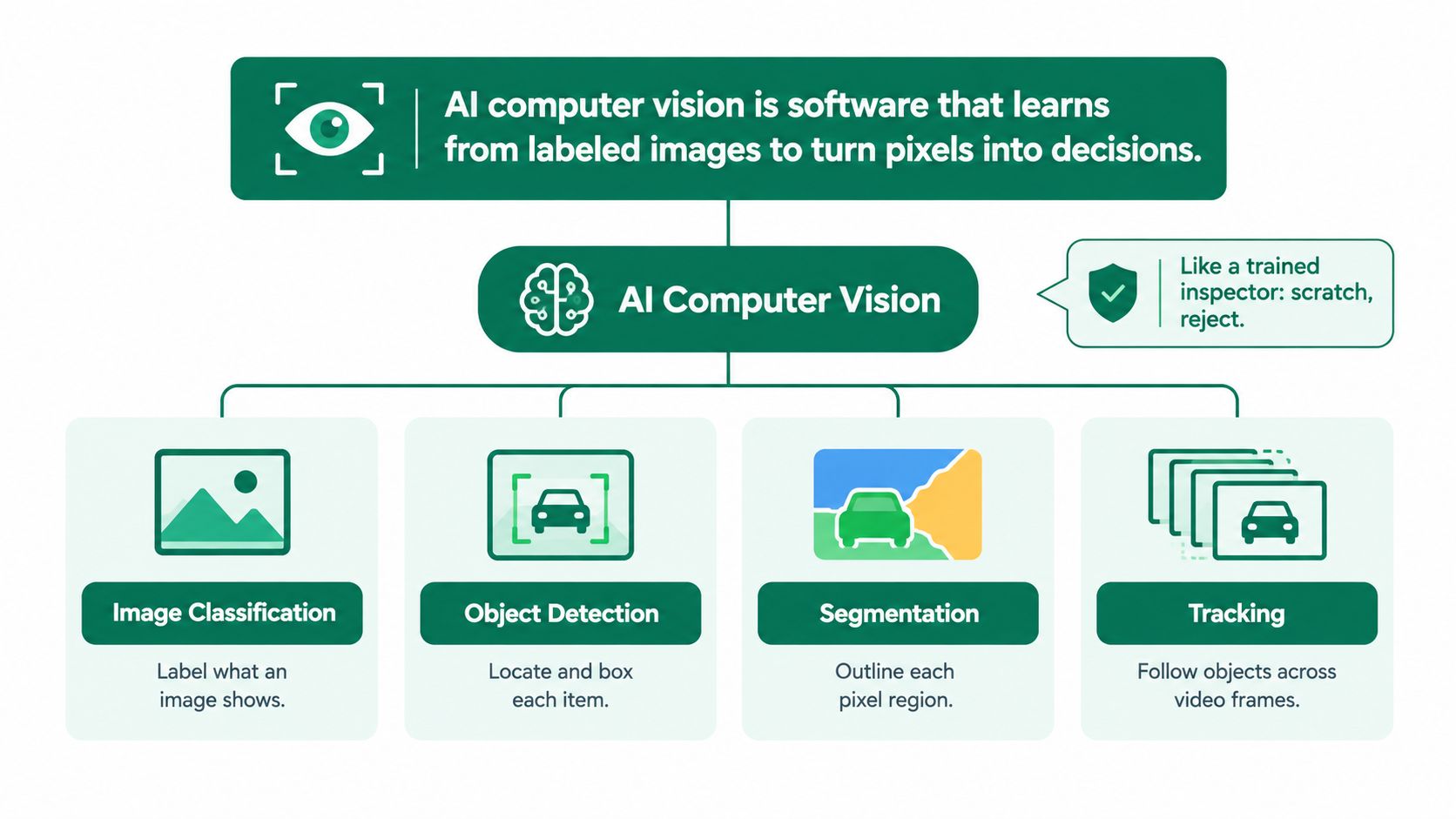
AI computer vision is software that learns from labeled images to turn pixels into decisions. Think of a trained inspector who glances at a part and says scratch, reject. The system doesn't follow a hand written rule about pixel brightness. It learns patterns from examples you've labeled, then applies those patterns to new images from your cameras.
The diagram below maps the definition to the core tasks that follow from it.
Classic rule based vision worked differently. Engineers set fixed thresholds for color, edge strength or size, and the system flagged anything outside those bounds. That approach can be precise in a stable cell, but it breaks when lighting shifts, a camera moves slightly, or a supplier changes packaging. Learned systems tolerate more variation because they've seen it in training examples, as long as you showed it to them in the first place.
Six Tasks and the Question Each One Answers
Each task answers a different question, and the question determines what you'll label and what action you can automate.
- Image classification asks what's in this image. You'd use it to sort product photos into pass or defect, or to route an incoming claim photo by damage type. The output is one label for the whole frame, so it's cheap to label but tells you nothing about where the problem sits.
- Object detection asks what's present and where. Counting pallets on a loading dock or finding every carton on a conveyor needs bounding boxes, not just a label. You get counts and locations you can hand to a warehouse system.
- Segmentation asks which pixels belong to which object. Measuring the area of a surface scratch, or the fill level in a container, needs an outline. It's the most informative output and the most expensive to label, because annotators trace boundaries by hand.
- Optical character recognition asks what text the image contains. Reading serial numbers, lot codes or shipping labels turns a photo into a string your existing systems can match. Errors here are easy to audit against a database.
- Pose estimation asks where the body joints are. Checking lifting posture on a warehouse floor or hand position near a press depends on joint locations over time, not on identifying the person.
- Object tracking asks which object is which across frames. Measuring queue length at a checkout or dwell time at a work station requires following the same item through video, so you don't count it twice.
One photo can answer several questions at once, but you should only pay for the output that triggers a business action.
That last point is where projects get scoped correctly or wasted. If a supervisor only needs a reject signal, classification may be enough and segmentation is wasted labeling budget. If maintenance needs to know whether a scratch is growing week over week, you need segmentation and a measurement in physical units. The task you choose sets the data you'll collect, the labels you'll pay for, and the cost of every future retraining cycle.
How Vision Models Learn and Which Architecture Fits
A model can ace a validation folder and still miss defects on the night shift. Training works like flashcards at scale: the model sees a labeled photo, guesses an answer, measures how wrong the guess is, and adjusts internal weights so the next guess is less wrong. Repeat that across the labeled set many times and the weights settle into a pattern recognizer tuned to your examples, including the gaps hidden in them. The reliability question starts there, because the examples decide which site, shift and operating condition the model has actually seen.
Three parts explain most of the behavior. Convolutional layers extract features, starting with edges and textures and building toward parts and whole objects. An output head turns those features into the answer the task needs: a label, a box or a mask. Pretrained weights let you start from a model that already recognizes generic visual structure, so the labeled set teaches your specific defects instead of teaching the model to see from zero.
The Milestone and the Data Question
The shift to learned features has a clear date. In the 2012 ImageNet challenge, AlexNet's authors report a 15.3% top 5 error rate against 26.2% for the runner up, a gap of more than 10 percentage points, on a task with about 1.2 million training images across 1,000 categories. That result moved the field toward representations learned from data, which is why labeling coverage now matters more than rule writing.
Coverage beats raw count for a narrow industrial task. A small set can work when the visual problem is narrow, the camera is fixed, lighting is controlled and pretrained weights supply the generic features. It fails when the set leaves out a conveyor speed, a seasonal label change, a cleaning cycle glare or a product variant that appears once a month. Audit the dataset by shift and condition, not by folder size, because the metric only matters where it must hold.
Architecture Families and When Each Fits
| Architecture family | Example models | Best fit | Main trade-off |
|---|---|---|---|
| CNN classifiers | ResNet, EfficientNet | Defect or category classification | Needs labeled examples per class; limited localization |
| Two-stage detectors | Faster R-CNN | High-accuracy detection where latency is secondary | Slower per frame than one-stage designs |
| One-stage detectors | YOLO family | Real-time detection on video and edge devices | May give up some localization accuracy for speed |
| Segmentation networks | U-Net | Precise area measurement, medical and surface analysis | Requires pixel-level masks to train |
| Vision transformers | ViT variants | Large datasets and transfer learning | Data and compute hungry |
| Promptable segmentation models | SAM family | Fast mask generation and labeling acceleration | Heavy compute; domain gaps need checking |
Read the table from right to left. The trade off column tells you what you will pay in labeling, compute or speed, and that is usually the binding constraint on a real line. A two stage detector that cannot keep up with the conveyor is useless even if its offline score looks strong.
Selection rule: Start from the output you need and the latency budget you have, then choose the smallest architecture that meets both on the site conditions you named.
Smaller models are cheaper to run, faster to retrain, and easier to fit on edge hardware near the camera. Move up in size only when a held out test, split by shift, camera and product variant, shows a specific failure that the larger model fixes. Starting large because a leaderboard favors it commits you to compute costs before the use case has proven value.
Enterprise Use Cases by Industry and Their Outcomes
Credence Research valued the global AI in computer vision market at USD 16.995 billion in 2024, projecting USD 77.988 billion by 2032. Spend on that scale explains the inbound sales calls and the polished demos. What it cannot tell you is whether a result earned on a vendor's test set will hold on your line, on your night shift, under your lighting.
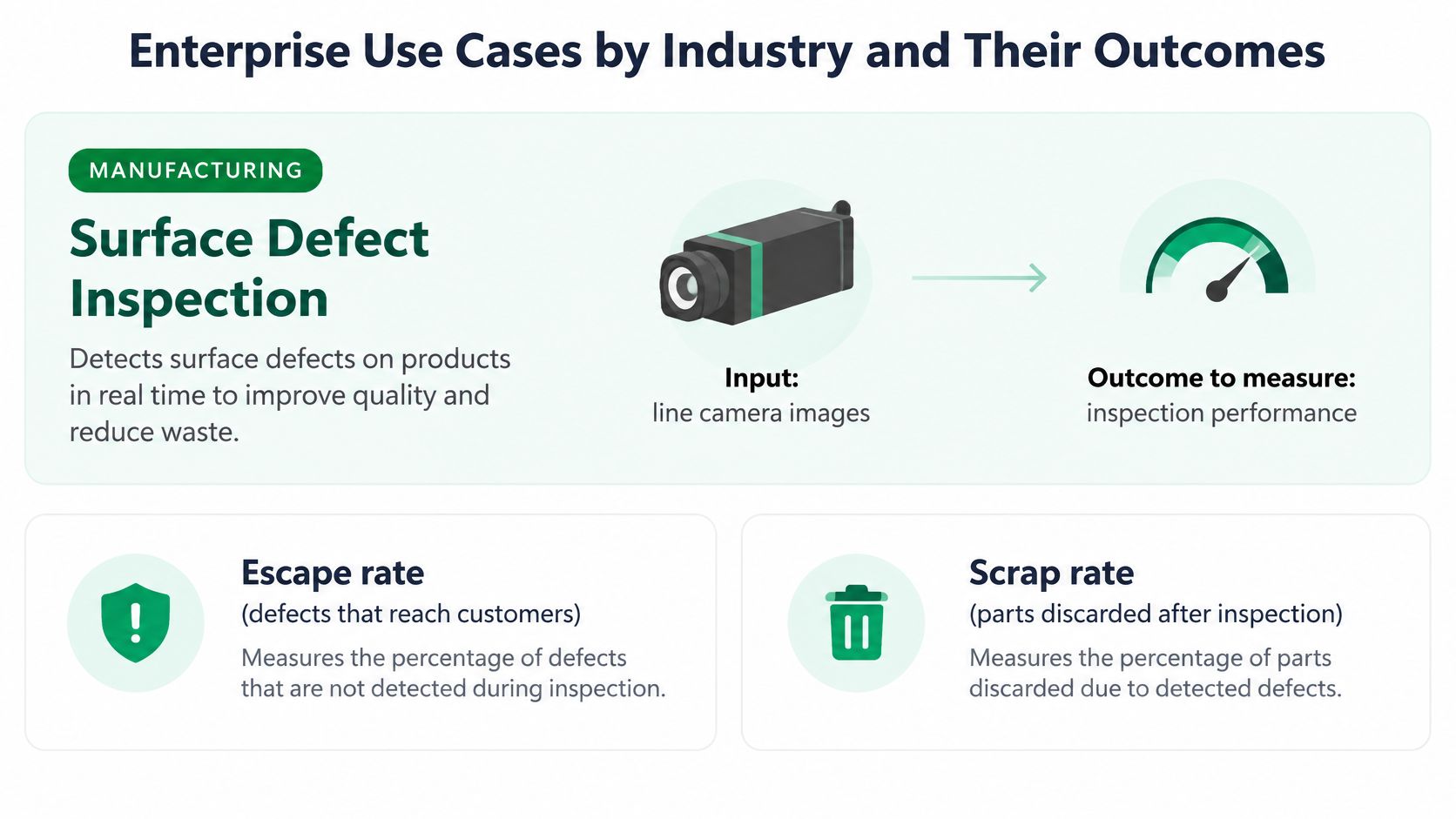
The illustration below shows the manufacturing row, where the input and the measured outcome sit closest together.
Enterprise Vision Use Cases by Industry
| Industry | Use case | Input data | Outcome to measure |
|---|---|---|---|
| Manufacturing | Surface defect inspection | Line camera images | Escape rate and scrap rate |
| Logistics | Parcel damage and label reading | Dock camera frames | Mis-sort rate and dwell time |
| Retail | Shelf availability monitoring | Store camera images | Out-of-stock hours |
| Healthcare | Image triage for priority reads | Scans and medical images | Time to prioritized read |
| Insurance | Vehicle damage assessment | Claim photos | Claim cycle time |
| Construction | PPE and zone safety detection | Site camera video | Incidents and near-miss reports |
| Agriculture | Crop stress and scouting | Drone or field imagery | Scouting hours per hectare |
| Financial services | ID and document image checks | Submitted ID photos | Verification time and fraud catch rate |
Read every published outcome as a conditional claim. The figure was produced at a specific site, on a specific shift, under specific operating conditions, and it travels only as far as those conditions match yours. A shelf monitoring result from a store with fixed ceiling cameras and stable lighting will not transfer to a site where staff move displays daily and sunlight floods the aisle each afternoon.
Outcomes themselves cluster in three places. Time appears as inspection hours, read times and claim cycle length. Quality appears as escapes, mis-sorts and returns. Risk appears as near misses and safety incidents. When a vendor pitch lands in one of those clusters against a number you already track, you have something testable. When it lands in none of them, the pilot will end in an argument about what success even meant.
Use the table as a matching exercise rather than a menu. Compare each row's camera setup and data constraints against your own site before you compare its outcomes. Teams weighing inspection work specifically can pressure-test that match against Applied's analysis of AI defect detection in production settings, which applies the same matching logic down at the defect level.
What Separates a Fundable Case From a Demonstration
Three things: volume, a clear action and a named owner. A repetitive manual check that runs every shift, triggers an immediate decision, and belongs to one operations manager will outperform a glamorous use case nobody owns. The owner matters because someone has to act on the alerts, adjudicate the borderline calls, and defend the baseline when finance asks whether the improvement is real or a measurement artifact.
Check the input data column candidly. Claim photos and submitted ID images arrive from devices you do not control, shot at variable angles and compressed unevenly. Line camera images come from hardware you can fix, calibrate and relight. Controlled inputs de-risk a first deployment, which is why manufacturing inspection so often becomes the starting point.
Which KPIs Prove Computer Vision Creates Value
A detection model posts a strong mAP on the vendor's benchmark, ships to the line, and then misses defects on the night shift because the lighting differs from the test images. The lab number was real. It just described a different environment.
That gap is why mAP belongs in the lab column. Mean average precision combines classification and localization quality on a fixed test set, and it is truly useful for ranking two models on identical data. It says nothing about whether operators will trust the output, whether the line keeps pace, or whether scrap fell.
Detector research makes the same point formally. Evaluations on MS COCO report mAP alongside parameter count, GFLOPs and GPU and CPU latency, because a model that gains accuracy but exceeds the latency or hardware budget can reduce operational value, especially on edge systems where CPU inference and memory dominate response time. Any benchmark you are quoted should state image resolution, batch size, processor, precision mode, and preprocessing and post processing time. Without those conditions, headline latency cannot be reproduced or compared.
KPIs for Vision Systems and How to Set Targets
| KPI | What it measures | Why it matters | Set the target by |
|---|---|---|---|
| Recall | Share of real defects or events caught | Missed cases drive escapes and returns | Cost of one missed event |
| Precision | Share of alerts that are real | Low precision overloads reviewers | Reviewer capacity per shift |
| mAP | Ranked detection quality on a test set | Useful for comparing models in the lab | Not a go-live target on its own |
| Throughput (FPS) | Frames processed per second | Must keep pace with camera rate | Camera frame rate and peak load |
| False alerts per shift | Alerts that need no action | Drives alert fatigue | Reviewer time budget |
| Intervention outcome | Hours saved, scrap avoided or returns prevented | Connects detection to business value | Pre-pilot baseline |
Recall and precision pull against each other, and the right balance is an economics question. On a weld inspection line, a missed crack can mean a field failure, so the team sets crack recall high and accepts lower precision, knowing a second human review clears the false alarms. A shelf monitoring system makes the opposite trade, because a false out of stock alert sends staff on a wasted walk to an aisle that is already stocked.
Only the last row of that table pays for the system.
Pair Every Metric With a Condition
Report each KPI by site, shift and operating condition rather than as one global average. Recall during the day shift with clean product can hide weak recall at night under different lighting. The stratified view is what turns a metric into an acceptance criterion, and it sits at the center of sound AI model evaluation practice for production systems.
Throughput deserves the same treatment. Measure it at peak load on the actual deployment hardware, including preprocessing and the time to write the decision to the line controller. A model that keeps pace at average volume but falls behind during a surge builds a queue of uninspected product at exactly the moment volume matters most.
Set thresholds before you see pilot results, so the KPI can't be bent toward whatever outcome the model happened to produce.
Toolchain, Governance and ROI Model
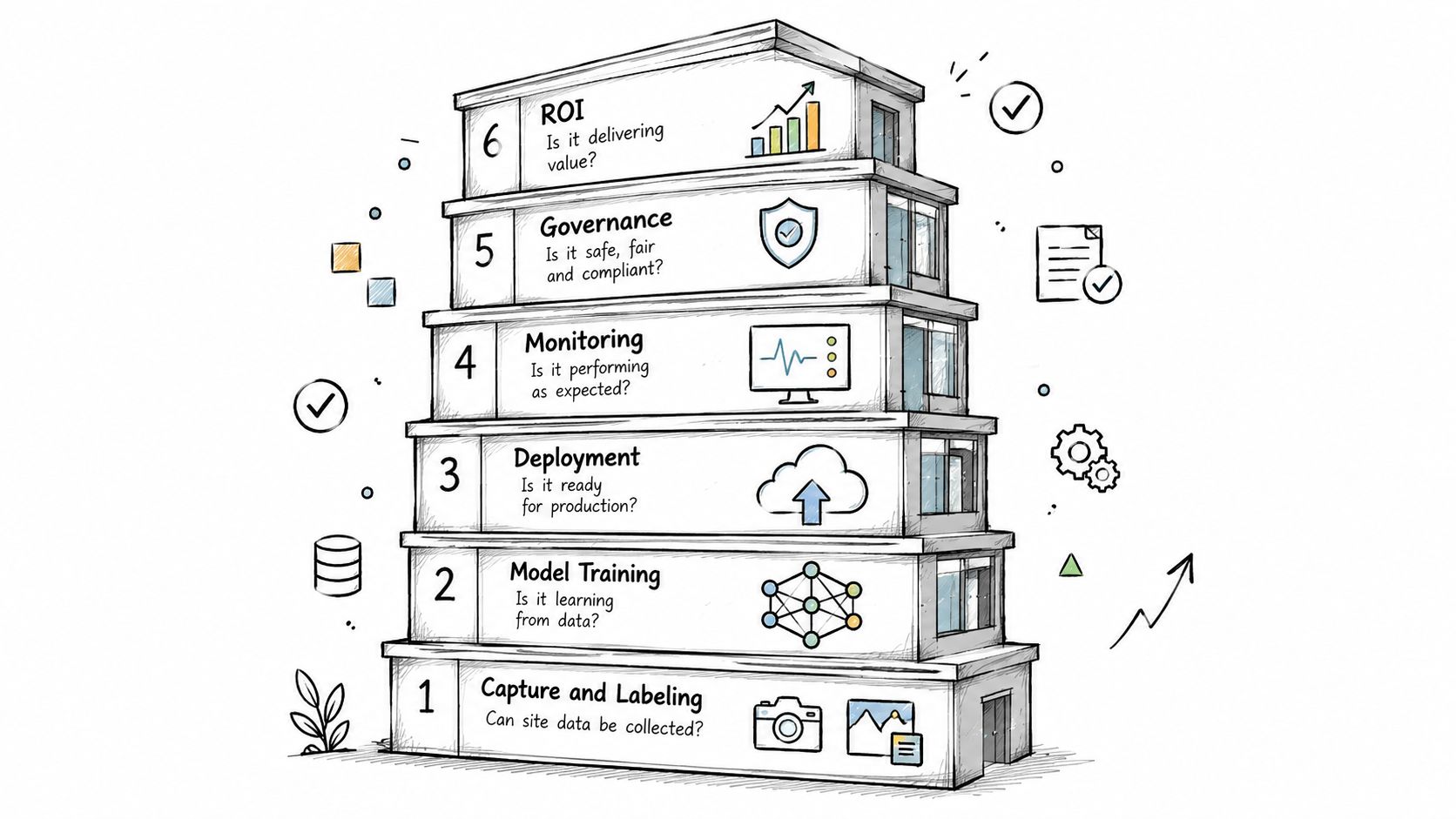
A working system is six layers, and most failures sit in the layers around the model rather than inside it. Each layer has one question it must answer before you scale.
The diagram below stacks those layers in the order a project moves through them.
Six Layers and Their Usual Failure
- Capture and labeling asks whether site data can be collected and labeled at volume. Camera SDKs feed annotation tools such as CVAT or Label Studio. The usual failure is inconsistent labels between annotators, which teaches the model your disagreement instead of the defect.
- Training asks whether the model starts from a suitable base. Teams typically fine tune pretrained weights in PyTorch or TensorFlow. The usual failure is overfitting to a small demo dataset that doesn't resemble production.
- Deployment asks whether inference meets the latency budget. Cloud GPUs suit batch analysis of stored imagery. Edge devices suit line speed decisions where a round trip is too slow or connectivity is unreliable.
- Monitoring asks whether degradation would be noticed within a week. Drift dashboards plus sampled human review catch the slow declines that no single alert reveals. If nobody looks at reviewed samples, you won't know recall fell until a customer complains.
- Integration asks where the decision goes and who acts on it. Outputs need to land in your MES, PLC, WMS, ERP or ticketing system with an owner attached. A detection that only appears on a dashboard nobody opens changes nothing.
- Governance asks who owns the model and its thresholds. Access logs, retention rules and a model registry record which version made which decision, so you can roll back and audit.
Governance Rules to Set at Design Time
Write consent and retention rules for images of people before cameras go up. Restrict how face data is stored and who can search it. Name one owner for each model who approves threshold changes, document those thresholds, and keep a rollback plan that restores the previous version quickly.
Biometric identification and workplace monitoring can fall under stricter regimes such as the EU AI Act, so legal review belongs at the design stage, not after installation. Retrofitting compliance usually means deleting data you needed or moving cameras you already paid to mount.
Building the ROI Model Honestly
Frame value as avoided cost first. Inspection hours no longer spent, scrap avoided because defects are caught earlier, returns prevented because escapes fell. Those are lines your finance partner can verify against existing reports.
Then subtract run costs that vendors often omit. Ongoing labeling for new variants, retraining cycles, monitoring effort, camera maintenance and the reviewer time consumed by false alerts all recur every year. A business case showing net gain after run costs survives scrutiny. One showing gross savings against a one time purchase price does not.
How to Run a Vision Pilot Step by Step
A pilot's job is to prove the process improved on your site, not that a model scored well in the lab. The steps below are ordered so each one protects the conclusion of the next, and the pass bar is fixed before any training begins.
The flow below shows the first two steps, which set your baseline and your target before any model work starts.
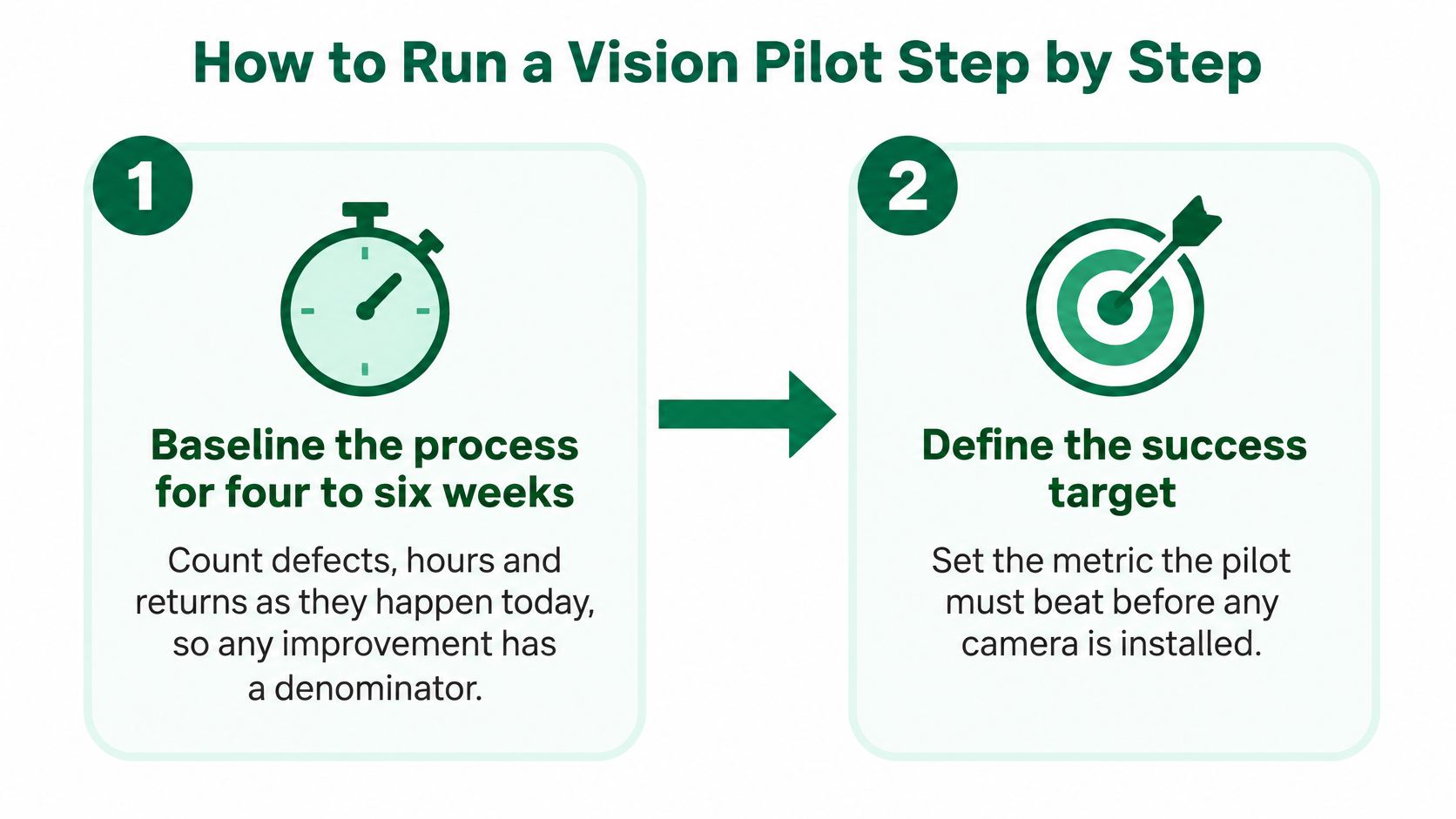
- Baseline the process for four to six weeks. Count defects, inspection hours and returns as they happen today, broken out by shift and product type. The common slip is reconstructing the baseline from memory or summary reports, which leaves your improvement claim without a denominator.
- Define the decision, its owner and the pass bar. Write down whether the model stops the line, diverts an item or sends a case to review, and who owns that action. In the same document, fix your go and no go criteria: a recall target per defect class, an alert ceiling per shift and an outcome gain over the baseline you just measured. Criteria written after results arrive will always describe the results.
- Collect site images across every condition. Cover all shifts, camera positions, lighting states and the full product mix. A clean sample gathered on one good morning overstates results and guarantees a surprise later.
- Label with two annotators and measure agreement. Where they disagree, resolve it in a written rule set with example images. Labels written by one person encode one person's judgment calls as ground truth.
- Hold out a test set collected independently. Use another week or another camera rather than a random split of training data. Random splits leak near duplicate frames into both sets and flatter the score.
- Run in shadow mode with weekly human review. The model flags items but people decide, and you review a random sample of its calls every week. Skipping shadow mode means your first real test happens on live product.
Step five deserves emphasis. Practical deployment guidance holds that testing only on a random split can overstate performance, while a held out set collected independently at the actual operating site gives a more credible estimate. The same guidance ties precision, recall and class specific confusion back to operating outcomes such as inspection hours, returns, throughput or safety events. A model can score well overall and still miss the one defect class that drives your return costs. Every number you accept should carry the site, shift and lighting state where it was measured, because a recall figure from a quiet morning says little about a night shift under glare.
For readers who prefer to watch the sequence rather than read it, a walkthrough follows.
Treat the pilot as a scoped experiment with a budget, a review date and an exit rule. Structuring it as a formal AI proof of concept with defined success criteria keeps scope from expanding every time a stakeholder suggests one more defect class. If the pilot misses its criteria, you want to learn that cheaply and know whether the gap is data, labeling or the use case itself.
Where Vision Projects Break and How to Fix Them
The pattern is familiar to anyone who has deployed one of these systems. The model performs well in the demo room, where the lighting is even and the parts are clean. On the factory floor, afternoon sun through a loading door washes out the camera's view, and defect after defect passes unflagged. Nothing about the model changed. The world around it did.
That gap is domain shift. Lighting, camera settings, weather, occlusion and differences in the people or products being imaged move production data away from training data. The model ends up answering questions about images that do not resemble the ones it learned from.
A 2024 CVPR study on test-time adaptation measured how much of that gap adapting during deployment can recover. Evaluating detectors under shifts including COCO to corrupted COCO and the SHIFT benchmark, the authors found that adaptation recovered up to 4.9 percentage points and 7.9 percentage points in mAP over the unadapted detectors, while sustaining roughly 20 frames per second. Two readings matter for planning. Adaptation buys back part of the lost accuracy at runtime, and whatever it cannot recover stays lost. Since you cannot know in advance which share your site will fall into, stress testing belongs in the acceptance criteria: corrupted, low light, weather affected, motion blurred and camera specific samples alongside clean validation images.
Common Vision Failures, Causes and Fixes
| Symptom | Likely cause | Fix |
|---|---|---|
| Works in the demo, fails on site | Domain shift from lighting or camera changes | Collect site images across conditions and retest |
| Too many false alarms | Low threshold or cluttered backgrounds | Raise thresholds by zone and add hard negative examples |
| Rare defect is missed | Long-tail class with few labels | Targeted labeling and oversampling of the rare class |
| Accuracy drifts over months | Seasonal light or product mix changes | Monitor by environment and schedule retraining |
| Operators ignore alerts | Alert fatigue | Cap alert volume and route to a review queue |
| Too slow on the edge device | Model too large for the hardware | Smaller architecture, quantization or cloud fallback |
| Labeling stalls | Too few labeled images | Pre-labeling with a model and active learning |
Read the table as a diagnostic order. Check data and thresholds before changing the architecture. False alarms against cluttered backgrounds usually yield to hard negative examples, images of the confusing background labeled as containing no defect. A rare missed defect usually yields to targeted collection, because a model cannot learn a class it rarely saw.
The Monitoring Rule That Catches Drift Early
Apply the per-condition reporting defined in the KPI section here, with a retraining trigger for any stratum that falls below its operational threshold. One addition worth making: recall needs labeled outcomes, and labels arrive slowly. Track input statistics that require no labels, such as brightness, contrast and detection counts per camera, so a distribution change surfaces within days rather than after the next labeling round.
Work the fixes in the order the table lists them: site coverage and thresholds first, labels and alert handling next, architecture last. Each earlier step is cheaper to test than training a larger network, and a monitoring rhythm that reviews conditions within weeks will catch drift a quarterly audit would miss.
Pick One Use Case and Set Its Baseline
A plant manager walks into a budget review with three candidate projects and walks out with none funded, because none had a measured baseline. That outcome is common enough to plan around. Pick one use case for the next planning cycle. A portfolio splits your labeling budget, your camera budget and your owner's attention across projects that each stay below the evidence threshold. One use case, instrumented properly, produces a result you can defend.
Score three candidates against five checks.
- Action within minutes: the model's output triggers a decision while the item or event is still actionable.
- Data in weeks: labeled examples can be collected from your site quickly, across conditions.
- Baseline already exists: current performance sits in logs or reports you can extract today.
- One named owner: a single person is accountable for the outcome and the alert workflow.
- Cost of a miss is known: you can price an escape, a mis sort or a missed safety event.
Pick the strongest scorer and record its baseline over four to six weeks using the KPIs defined earlier. Record it stratified, by camera, shift, lighting condition and product family, the same split the monitoring rule uses. A single averaged baseline repeats the failure that rule was built to catch: one line can look acceptable in the mean while it is already leaking defects.
For candidate research, a catalog such as Applied's library of AI use cases, organized by industry, business function and outcome, lets you filter for vision deployments with camera setups, data volumes and operating environments similar to yours. Results from a dissimilar site tell you little about yours.
Then write the one page go and no go note. Name the owner, the review date, the recall target per stratum, the alert ceiling and the rollback rule. That document is what separates a pilot from an open ended trial. Your first meeting needs four agenda items: confirm the baseline and who measures it, agree the shortlist scored against the five checks, name the pilot owner, set the review date. Leave the room with those four decisions written down and the project starts ahead of most vision efforts at the same stage.