AI in Software Development: Key Use Cases and Outcomes
Discover how ai in software development transforms workflows, boosts productivity, and drives better outcomes. Learn practical adoption strategies for your
October 20, 2026
AI in software development is mainstream: 85% of developers report regular use, but randomized productivity studies show mixed outcomes, including a 26.08% increase in completed tasks in a large workplace experiment. The gains are conditional on the task, developer experience, and the effort required to review and validate the result.
That distinction changes the investment decision. Engineering leaders shouldn't ask only whether an assistant writes code faster. They should ask whether their teams deliver more production-ready work without transferring the cost to reviewers, security engineers, maintainers, or junior developers who haven't yet learned to recognize a plausible mistake.
Table of Contents
- Why AI in Software Development Is a Measurement Problem First
- Mapping AI Use Cases Across the Software Development Lifecycle
- What the Evidence Actually Shows About Productivity Gains
- Tool Categories and How Engineering Teams Choose Between Them
- Measuring What Matters Beyond Lines of Code
- Governance, Trust, and the Junior-Engineer Pipeline
- A Practical Roadmap from Pilot to Scale
Why AI in Software Development Is a Measurement Problem First
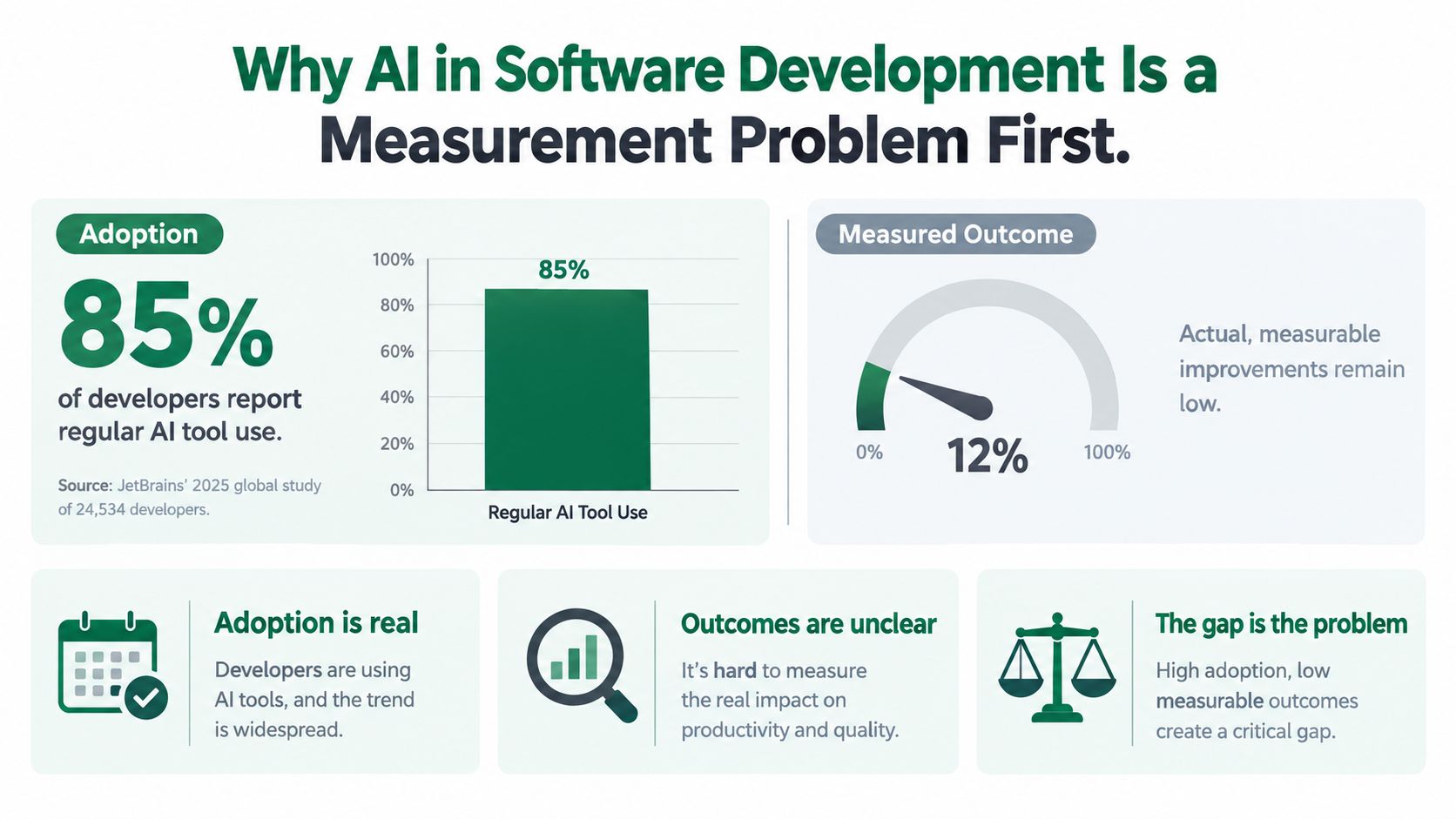
Adoption measures behavior, not engineering value. JetBrains' 2025 State of Developer Ecosystem study surveyed 24,534 developers across 194 countries and found that 85% regularly used AI tools for coding and development, while 62% relied on an AI coding assistant, agent, or AI-enabled editor, according to the JetBrains global developer study.
Those categories matter. Regular AI use can mean asking for an explanation, drafting documentation, or delegating implementation. Treating every user as an equally intensive adopter makes an organization's adoption dashboard difficult to interpret.
The central distinction is between how widely teams use AI and what those teams achieve.
Separate activity from accepted work
The graphic's outcome gauge should be read conceptually, not as a measured industry-wide productivity score. The available evidence doesn't establish a universal gap of a particular size between adoption and improvement.
A useful evaluation instead distinguishes:
- Tool activity: Who uses an assistant, for which tasks, and with what permissions?
- Accepted throughput: What work reaches the team's definition of done?
- Downstream consequences: How much correction, operational exposure, and maintenance does that work create?
These aren't interchangeable. A developer accepting more suggestions demonstrates engagement with the tool. It doesn't establish that customers received a reliable improvement sooner.
Measurement principle: Count the work your organization can safely accept, not merely the work an assistant can produce.
Define success before choosing software
My recommendation is to make the unit of evaluation a task within a workflow, rather than a developer or a subscription. A documentation update, a permissions change, and a repository-wide migration require different evidence of correctness.
Before a pilot, define the task boundary, acceptance criteria, comparison conditions, and accountable owner. Include the reviewer's effort rather than treating it as an external cost.
This produces a more useful question than whether AI makes developers productive: Which combinations of task, repository, experience, and supervision produce a net improvement? It also prevents a misleading conclusion in either direction. Successful use on bounded work doesn't justify unrestricted delegation, while failure on a difficult maintenance task doesn't invalidate every other application.
Mapping AI Use Cases Across the Software Development Lifecycle
The strongest starting point is to map capabilities to your actual bottlenecks. In Stack Overflow's 2024 survey, developers expected greater AI integration in documentation at 81%, testing at 80%, and writing code at 76%, according to its AI workflow findings. These were expectations, not measured success rates or proof of production maturity.
The following map is an evaluation framework. Its examples describe candidate workflows, not claimed deployment results, and its maturity labels indicate how cautiously I would delegate each task.
AI Capabilities Across the SDLC
| SDLC Stage | Typical AI Capability | Maturity |
|---|---|---|
| Requirements | Draft acceptance criteria from approved product notes | Assisted drafting, human validation |
| Design | Propose interfaces and document architectural alternatives | Advisory, judgment-intensive |
| Coding | Draft a bounded function or implementation change | Suitable for controlled evaluation |
| Code review | Explain a diff and flag suspected inconsistencies | Supplementary review |
| Testing | Propose cases, fixtures, and boundary conditions | Assisted creation, independent verification |
| CI/CD | Draft pipeline changes or investigate failed builds | Permission-sensitive |
| Observability | Summarize incident evidence and propose hypotheses | Advisory, operationally sensitive |
| Maintenance | Explain dependencies or propose a migration sequence | Repository-dependent |
Requirements and design deserve a distinction between producing a document and resolving uncertainty. For example, ask an assistant to turn approved product notes into draft acceptance criteria, then have a product owner identify missing behavior. For architecture, ask for alternatives and failure modes, not an authoritative decision.
Coding and review should remain separate activities. A candidate implementation might translate a specified validation rule into code; a reviewer must still check whether the rule belongs at that boundary and whether existing abstractions already implement it. A practical code review automation framework can help teams define which checks to automate and which decisions retain a named owner.
Evaluate the less visible handoffs
For testing, a useful pilot is generating boundary cases from a specification rather than asking for tests that agree with the implementation. An engineer should inspect whether the assertions express the intended behavior.
For CI/CD and observability, start with recommendations rather than execution. Let an assistant propose an explanation for a failed build or summarize incident evidence, then compare its output with the actual logs and configuration.
Browser-based validation introduces another interface. Clearcote Labs' explanation of how AI browser agents automate the web offers context for evaluating UI-driven workflows, such as checking a staging journey, without confusing browser interaction with proof of application correctness.
For maintenance, evaluate a bounded dependency explanation before delegating a broad migration. The decision isn't whether the assistant can propose edits. It's whether an engineer can verify the relevant behavior and safely reverse the change.
What the Evidence Actually Shows About Productivity Gains
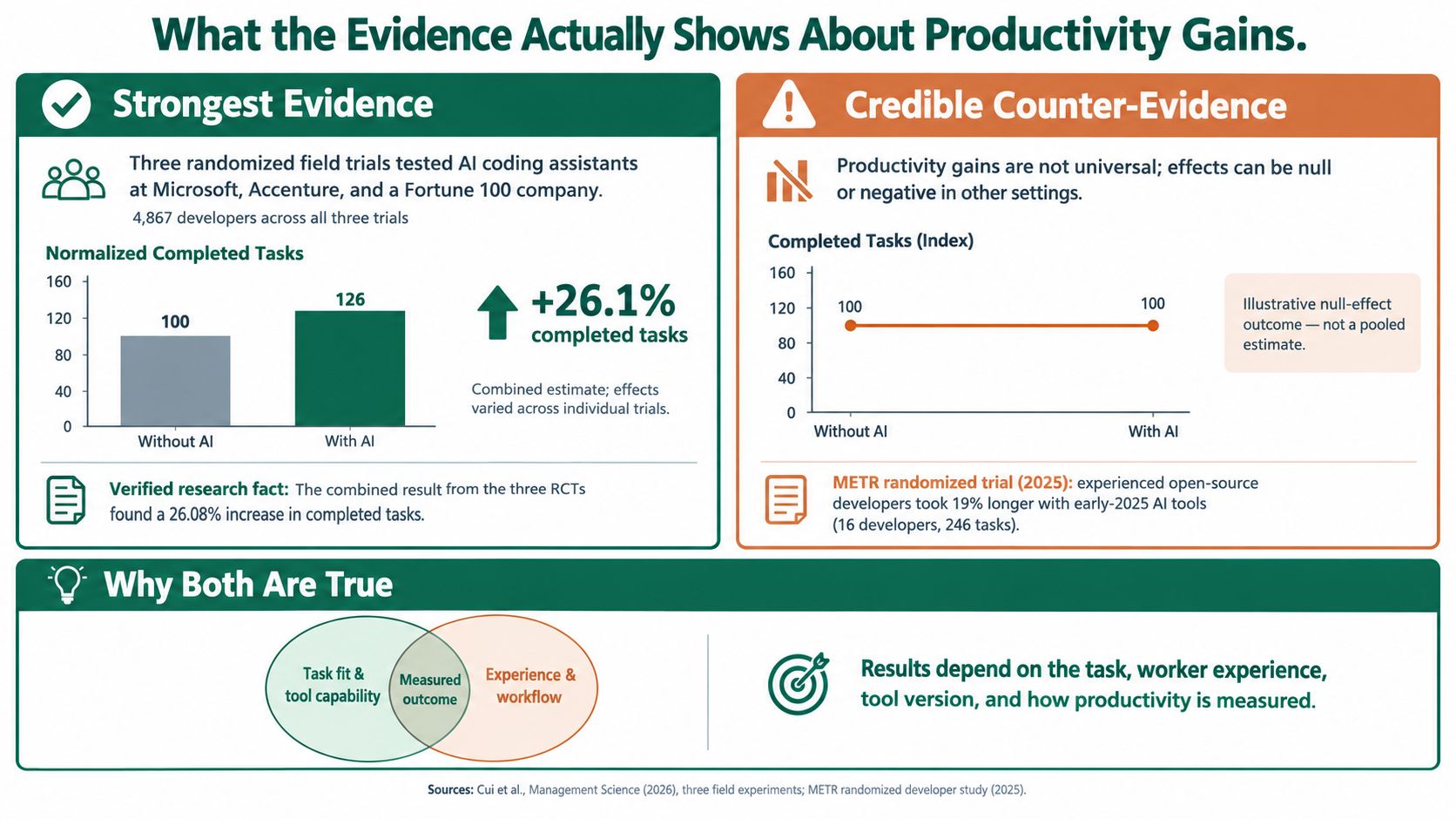
The strongest positive evidence measures completed work rather than typing speed. A randomized field study across Microsoft, Accenture, and an anonymous Fortune 100 company included 4,867 developers and found 26.08% more completed tasks among developers given AI assistance, with a 10.3% standard error; less-experienced developers showed higher adoption and larger gains, according to the cross-company randomized field experiments.
That is meaningful evidence, but it isn't a promise about your backlog. The researchers described the individual experiments as noisy, so the combined estimate shouldn't become a blanket capacity multiplier.
The comparison below illustrates the contextual question, not a universal division between successful and unsuccessful teams.
Why the findings can differ
METR's randomized evaluation of experienced open-source developers provides an important counterweight. It recruited 16 developers working in large repositories associated with averages exceeding 22,000 stars and one million lines of code, testing assistance in real working environments rather than isolated programming puzzles, as described in the METR study of experienced developers.
Its findings challenge the assumption that access automatically produces faster completion. I would not describe the contrast as productivity gains versus null results: the substantive lesson is that experienced developers in familiar, mature repositories can face costs that a broad workplace average doesn't predict.
My interpretation is that these studies answer different operational questions. An assistant may reduce the effort of producing an unfamiliar implementation while adding verification work for an expert who already knows the repository's conventions and likely solution.
An average benefit is evidence for experimentation, not permission to skip a local comparison.
Translate evidence into an evaluation
A useful experiment should record task type, developer experience, repository familiarity, and the full acceptance process. Otherwise, teams can't distinguish a weak tool from a poor task match or an unnecessarily expensive review workflow.
For a broader product-workflow perspective, SpecStory, Inc.’s guide from discovery to delivery with AI is a useful companion when defining the boundaries of that evaluation.
Use the following video as discussion material alongside, rather than in place of, the study methods.
Named deployment accounts also deserve scrutiny. When reviewing Postman's developer productivity use case, examine the measured activity, baseline, and scope before transferring any headline outcome into a staffing forecast. A deployment account can explain a workflow; it doesn't establish that another organization will reproduce its result.
Tool Categories and How Engineering Teams Choose Between Them
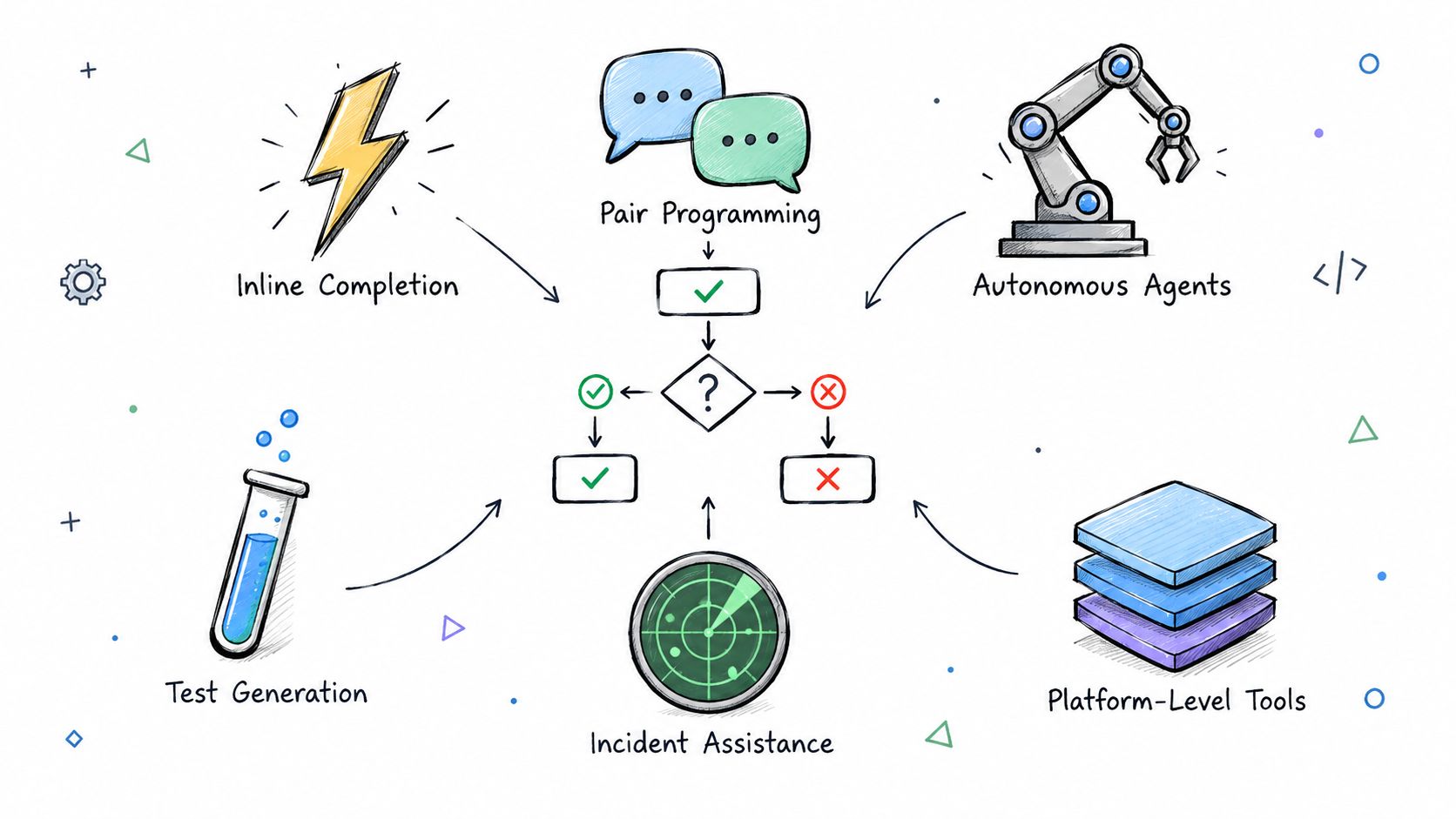
Choose the degree of delegation before choosing the interface. Inline suggestions and autonomous changes involve different approval boundaries, even when vendors describe both as coding assistance.
Enterprise adoption also varies in depth. An IDC survey of 1,015 technology professionals, conducted in November 2024, found that 29.5% reported broad organizational use of coding assistants for at least a year, while 89% of developers reported productivity improvements, according to the IDC coding-assistant adoption survey. Reported improvement supports the case for evaluation, but it isn't equivalent to a controlled measurement of delivery outcomes.
Compare functions and permission boundaries
| Category | Appropriate evaluation question | Main selection concern |
|---|---|---|
| Inline completion | Does suggestion acceptance reduce effort on bounded edits? | Editor integration and context handling |
| Chat-based pair programming | Do explanations and proposed changes help resolve tasks? | Repository grounding and verifiability |
| Autonomous coding agents | Can delegated changes reach acceptance safely? | Execution permissions and audit trails |
| Test generation | Do proposed tests detect relevant failures? | Assertion quality and independent coverage |
| Incident assistants | Are summaries and hypotheses supported by operational evidence? | Sensitive data and action controls |
| Platform governance | Can administrators enforce policy consistently? | Access management and reporting |
This workflow view helps separate assistance from authority.
Evaluate the operating model
Start with integration depth. Can the proposed setup use the necessary repository context without requiring developers to repeatedly reconstruct it? Does it fit the team's review and issue-tracking process?
Then examine data handling and auditability. Ask which files and prompts leave your environment, what retention controls apply, and whether administrators can reconstruct an agent's actions. For tools that execute commands, inspect permission boundaries and credential exposure separately from output quality.
Model choice should be evaluated through reproducible tasks, not brand preference. If a tool allows switching models, require the same acceptance criteria across configurations and record changes that could affect the pilot.
Finally, calculate total cost of ownership using licensing, execution consumption, integration work, administration, and verification effort. A low subscription price doesn't establish a low cost per accepted change.
An AI code-generation tool guide can help build a shortlist. Procurement should still require candidates to complete representative work under the same operational constraints.
Measuring What Matters Beyond Lines of Code
Fast generation can conceal expensive correction. In Stack Overflow's 2025 survey, 66% identified almost-right outputs as their biggest frustration, 45% said debugging AI-generated code was more time-consuming, and only 33% trusted AI-tool accuracy compared with 46% who distrusted it, according to the 2025 developer survey findings.
Those responses don't establish a universal quality penalty. They do identify a measurement blind spot: a developer can finish drafting sooner while the team spends longer achieving an acceptable result.
Build a cost-of-quality scorecard
| Metric | What to record | What it helps distinguish |
|---|---|---|
| Throughput | Accepted tasks and end-to-end cycle time | Delivery from generation activity |
| Review burden | Active review effort and revision rounds | Author savings from reviewer cost |
| Rework | Debugging and correction linked to the change | Initial completion from durable completion |
| Escaped defects | Production defects associated with changes | Passing checks from actual correctness |
| Incident risk | Rollbacks, incidents, and severity | Routine output from operational consequences |
| Maintainability | Subsequent change effort and architectural exceptions | Immediate delivery from future obligations |
Use this scorecard to track linked outcomes rather than an isolated productivity number.
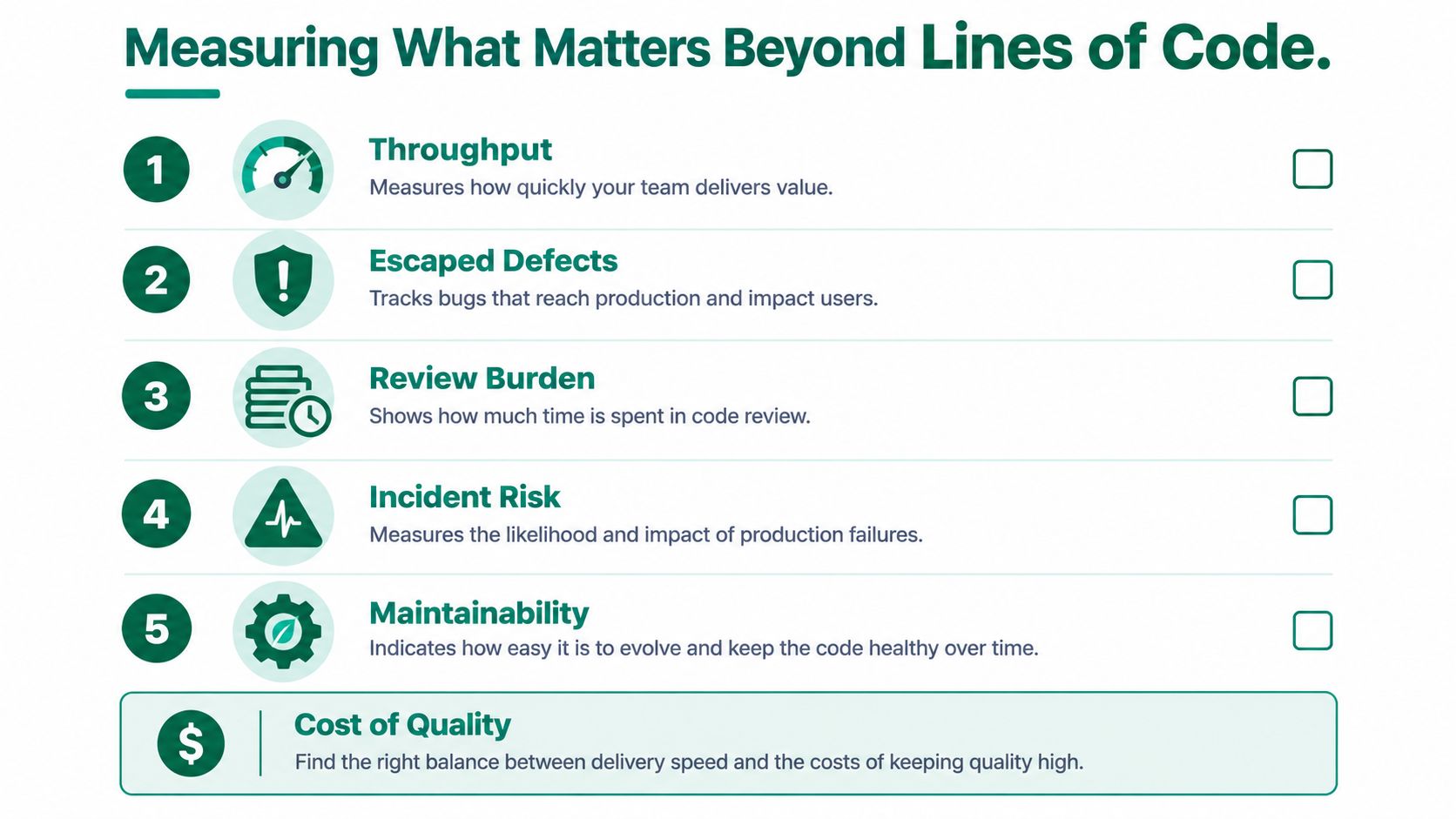
For example, compare assisted and unassisted tasks within similar work categories. Record assistance type and relevant repository conditions so a difficult security change isn't compared casually with a documentation correction.
Avoid using these measurements as a simplistic individual ranking. My recommendation is to use them to improve task selection and workflow design, with enough context to explain why a result changed.
AuricIDE's explanation of what Verify actually counts in AuricIDE provides another lens for examining verification terminology. The evaluation question remains whether a recorded check establishes the property your team needs.
Treat security as an outcome
An analysis of 1,689 generated programs across 89 security scenarios found approximately 40% vulnerable, including 39.33% of top-ranked outputs and 40.73% across all outputs; a separate analysis of 452 Copilot-generated snippets found weaknesses in 29.6%, spanning 38 CWE categories, as summarized in the ACM security research highlight.
These are findings from particular evaluations, not a forecast for every current assistant or repository. They nevertheless make successful compilation an inadequate security acceptance rule.
Release gate: Treat generated code as an untrusted contribution until it passes the controls appropriate to the change.
Enforce branch protection and mandatory review. Run static application security testing, dependency scanning, and security-focused tests in CI, and don't authorize automatic merging solely because functional tests pass.
Governance, Trust, and the Junior-Engineer Pipeline
Governance should specify who can submit data, authorize actions, accept changes, and own failures. A policy that merely tells developers to review AI output leaves those operational responsibilities unresolved.
NIST's guidance recommends careful handling of prompts, user data, model inputs, and outputs, including contextual logging, analysis, validation, sanitization or rejection, and encoding to prevent unauthorized code execution, as described in its generative AI secure-development guidance. The practical implication is to define enforceable controls around artifacts and actions, rather than granting trust because an approved development tool produced them.
Connect permission to demonstrated competence
Developer concerns reinforce the need for explicit boundaries. Stack Overflow's AI findings report 81% concerned about data security and privacy and 87% concerned about accuracy, according to its 2025 AI survey results.
Concern isn't proof that skill atrophy has occurred. Nor does the field experiment's stronger result for less-experienced developers prove that assistance improves long-term learning. Immediate task performance and durable engineering competence are different outcomes.
I recommend making that distinction visible in onboarding and progression:
- Explain before accepting: Ask junior engineers to describe the implementation, assumptions, and failure modes before approval.
- Preserve independent practice: Include debugging and code-reading exercises without assistant-generated answers.
- Pair around verification: Have mentors explain why they reject a suggestion, not just provide a better prompt.
- Retain named ownership: Assign responsibility for the merged change to an engineer, regardless of how it was drafted.
- Assess judgment: Evaluate defect detection, architectural reasoning, and incident response alongside delivered work.
Don't confuse dependence with development
A junior engineer who can generate a solution may still need practice identifying why it fails. Conversely, restricting assistants indiscriminately can prevent teams from testing useful forms of explanation and guided exploration.
The appropriate response is a learning design, not an assumption in either direction. Track whether engineers can explain and modify their work independently, then expand approval rights as they demonstrate competence.
This connects governance with the engineering pipeline: the people authorized to accept machine-generated changes must also develop the knowledge needed to diagnose them later.
A Practical Roadmap from Pilot to Scale
A useful rollout is a sequence of decisions with explicit evidence requirements. Don't expand because usage rises or demonstrations look impressive. Expand when a defined workflow produces acceptable delivery outcomes under its intended controls.
Pilot and harden
Pilot a bounded task family. Select representative work with observable acceptance criteria, then compare end-to-end cycle time and accepted output against an appropriate baseline. Record repository familiarity and assistance type so the results remain interpretable.
Escalate recurring ambiguity in requirements rather than asking developers to compensate through repeated prompting. Gate continuation on whether the workflow solves the chosen bottleneck, not whether participants enjoy the interface.
Harden the workflow before broadening access. Use the cost-of-quality scorecard to examine escaped defects and review effort. Define a review-to-commit ratio carefully, including its units, so managers can distinguish additional checking from increased delivery.
Gate expansion on functioning security checks, traceable actions, and a responsible owner. Escalate permission or data-handling exceptions to the appropriate security and platform teams.
Expand and govern
Expand by task and repository class. A successful pilot should authorize the tested pattern, not every available agent capability. Reassess outcomes when teams change models, repositories, permissions, or task complexity.
Track onboarding through independent task completion as well as elapsed time. Escalate signs that new engineers can produce changes but can't explain, debug, or maintain them.
Govern continuously. Maintain an approved-use inventory, review exceptions, and retire workflows that no longer justify their operating cost. Revisit the experienced-developer evidence before assuming that broader context access or more generated code necessarily means faster delivery.
The final decision rule is straightforward: scale a measured workflow, not a general belief about AI. Keep the option to narrow delegation when the evidence supports assistance but not autonomy.
Applied offers a curated library of verified AI deployments, measurable outcomes, and tools organized by industry and business function. Visit Applied and create an account to compare software-engineering use cases, inspect how organizations measure results, and build a shortlist around your team's actual bottlenecks.